Policy Learning
Updated: 2026-10-01
For commands to run a saved checkpoint, use the Deploy guide.
dmani-policy provides dataset export, training, checkpoint inspection, offline
evaluation, a local inference server, and robot deployment for
Diffusion Policy (DP) and Action Chunking Transformer (ACT). Both models use
camera images and measured joint positions to predict chunks of absolute joint
targets in radians. Joint order is always the selected rig's arm joints followed
by its hand joints. Dimensions and active sides come from the recording.
The model implementations and checkpoint processors come from LeRobot 0.5.1. The robot process exchanges bounded JSON and numeric arrays with the inference server. It does not import PyTorch or LeRobot.
#UR5e + Sharpa ACT support
Both ACT variants control the UR5e arm and left Sharpa hand with 28 absolute joint-position targets: six arm joints followed by 22 hand joints.
- ACT (
--policy act) predicts from RGB images and measured joint state. It supports simulation, dummy output, and hardware. Watch the ACT rollout demo. - ACT-Tactile (
--policy tactile_act) also uses the five fingertips' physical DEFORM maps. Deployment requires one Sharpa hand in--mode hw. Watch the tactile ACT rollout demo.
Both use the same state manager and command safety gates, with temporal ensembling at 30 Hz by default. The Deploy guide covers checkpoint selection, serving, passive prediction preview, and measured-pose startup.
#ACT and ACT-Tactile architecture
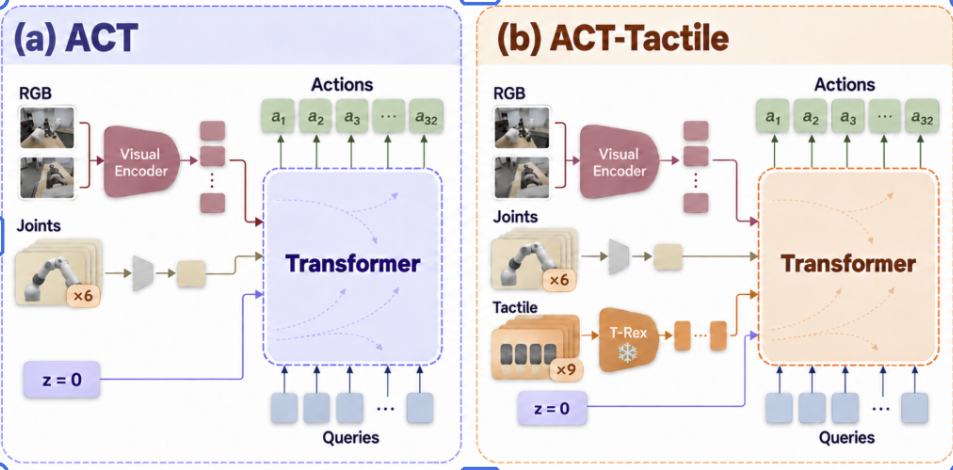
RGB features and projected joint history condition a Transformer that predicts
a chunk of 32 actions from learned action queries. ACT-Tactile adds frozen
T-Rex features from five fingertips, with finger and time embeddings. Both use
z = 0 during inference.
The figure shows the six-frame joint-history recipes in
configs/policy_act_joint6.yml and configs/policy_tactile_act.yml; tactile ACT
also uses nine tactile frames. The base configs/policy_act.yml uses one joint
frame. History lengths and chunk size come from the saved checkpoint when
serving or deploying it.
#Environment
uv sync
uv sync --project environments/policy --locked
uv run dmani-policy --help
The learning environment has its own pyproject.toml and committed uv.lock,
with LeRobot 0.5.1, PyTorch 2.10, and torchvision 0.25. Dataset, train, evaluate,
and serve commands automatically enter that environment through uv. Models use
CUDA when available; --device cpu selects CPU. Model weights and datasets stay
local; these commands do not upload to the Hugging Face Hub or enable W&B.
#Record demonstrations
Use the ordinary recorder and add one or more named RGB cameras:
# Vive + glove controlling MuJoCo; select the intended rig explicitly.
uv run dmani-record run --robot ur5e-wuji --input vive \
  --camera front=/dev/video0 --camera wrist=/dev/video2 \
  --task "pick up the cube" --operator weison

# Hardware-free infrastructure check, including synthetic RGB frames.
uv run dmani-record run --robot ur5e --headless --duration 8 \
  --camera front=synthetic --task "infrastructure check"

# The common and family launchers accept the same camera options.
uv run tianji --arm-mode right --record --camera front=/dev/video0 \
  --task "pick up the cube"
Camera sources accept an OpenCV device path, numeric device index, video file,
or synthetic. Video exhaustion and camera read failures fault the session.
Synthetic images test infrastructure; they provide no view of the scene.
Rig camera presets determine each view's resolution and rates. The wrist
captures at 90 FPS and saves at 30 FPS with its full 640 × 480 RGB view; the
current UR5e + Sharpa ZED captures at 60 FPS and saves its native
1280 × 720 left view at 30 FPS. Camera sizes support either a legacy square
integer or [width, height], and native-sized frames keep their
full field of view. Generic cameras without rig defaults use 256 × 256 at 30 FPS.
--image-size overrides all views to a square; --camera-fps overrides both
capture and saved rates. Frames are JPEG encoded once, and each file is saved
before its Parquet index row. OpenCV timestamps identify host read completion,
not camera exposure time; device/driver buffering can add latency.
Press a to engage/pause and y to keep a completed episode. Kept episodes can also be selected after capture:
uv run dmani-record inspect out/recordings/SESSION
uv run dmani-record review out/recordings/SESSION --episode 1 --decision keep
See session recording for the full review and recovery workflow.
#Build the training dataset
For one recording, use the local media reviewer to inspect its RGB cameras and five fingertip tactile streams without a simulator. Mark unusable takes, enter a task instruction, and save an MP4-backed LeRobot v3 dataset:
uv run lerobot out/recordings/SESSIONIf an interrupted session or boundary-order warning disables review, click Recover and audit saved takes (or Audit saved takes after recovery). A passing audit unlocks review of sealed takes; incomplete takes remain excluded. The page keeps the warning visible.
For several reviewed recordings, use the batch exporter:
uv run dmani-policy dataset \
  --sessions out/recordings/SESSION_A out/recordings/SESSION_B \
  --output out/datasets/cube --repo-id local/cube
Add --videos to the batch command to store RGB streams as MP4. Without it,
the batch command keeps its existing image-backed LeRobot v3 output.
The exporter takes only explicitly kept, sealed episodes. Sessions must have
the same robot, joint order, active sides, and camera names/shapes. A task label
is required; --task TEXT can supply one for older recordings. Policy rollouts
require an explicit --include-policy flag.
Each frame contains:
| Feature | Contents |
|---|---|
observation.state |
Measured arm joints followed by measured hand joints |
observation.images.NAME |
Decoded RGB image for each named camera |
action |
State manager arm targets followed by hand targets |
task |
Recorded or explicitly supplied task label |
Actions are the desired absolute positions sent to the sinks. CommandGate still applies its rate limits at execution; recorded targets are not measured motion. Task strings label the data; these DP/ACT models are not language conditioned.
By default, export uses a 30 Hz grid, including for older sessions with
higher saved camera rates. --fps selects an explicit grid rate for offline
exports. Each image feature retains
its recorded dimensions, including the wrist's 640 × 480 view.
Alignment uses the latest preceding sample on that grid, within
--max-age (0.15 seconds by default). Wrist, ZED, and the optional D405
save at 30 FPS by default. Slower views reuse their latest frame between captures.
Export rejects a camera whose measured rate is
materially below its configured saved rate (or the export rate, if lower). All streams use source timestamps when
every required sample supplies one; otherwise all use receipt timestamps.
Initial warmup is trimmed. Internal or trailing stale gaps, missing chunks,
nonfinite joints, invalid timestamps, and ambiguous episode boundaries are
errors. Samples from different episodes are never joined.
The output is a LeRobot v3 dataset with RGB images or MP4 video, depending on
the export command. meta/dmani.json records the rig, camera contract,
alignment settings, episode provenance, and config hashes. Recorded tactile
payloads remain in the source session for review.
alignment/episode_*.npz retains the grid and selected stream timestamps. The
original session stays unchanged. Export publishes into a new directory only
after the dataset is finalized.
Both visual policies require at least one recorded camera. Existing sessions without images remain useful for replay and telemetry, but cannot train these visual models.
#Train and resume
uv run dmani-policy train --policy dp --dataset out/datasets/cube --output out/policies/cube-dp
uv run dmani-policy train --policy act --dataset out/datasets/cube --output out/policies/cube-act

# Steps is the total target step count, including completed steps.
uv run dmani-policy train --policy act --dataset out/datasets/cube \
  --output out/policies/cube-act --resume --steps 150000
ACT can concatenate past measured joint frames into its state input. Tactile
ACT separately encodes past five-finger DEFORM maps as time-positioned tokens.
Tune observation_history in configs/policy_tactile_act.yml (or a copy passed
with --training-config). The default preset uses:
observation_history:
  joint_frames: 6
  joint_stride: 1
  tactile_frames: 9
  tactile_stride: 1
Then launch training with that YAML:
uv run dmani-policy train --policy tactile_act \
  --training-config configs/policy_tactile_act.yml \
  --dataset out/datasets/9_25_tossing_putaozhi_49 \
  --trex-checkpoint /home/weison/T-Rex/outputs/checkpoints/trex_deform_only/model.pt \
  --output out/policies/tactile-act-j6-t9

# Visual ACT uses joint_frames and joint_stride in configs/policy_act.yml.
uv run dmani-policy train --policy act --dataset out/datasets/cube \
  --training-config configs/policy_act.yml --output out/policies/cube-act-j1
At 30 Hz, the tactile ACT default selects joint frames [t−5, …, t],
oldest first, and concatenates their angles. It separately selects tactile
frames [t−8, …, t]; each contains five deformation maps. RGB uses the current
frame. Both strides default to 1. Visual ACT defaults to one current joint
frame. At an episode's start, unavailable past frames repeat its first frame.
The checkpoint saves both windows; resume uses those saved values. The matching CLI flags remain optional
overrides for a single launch and cannot change a resumed run.
Training presets are configs/policy_dp.yml, configs/policy_act.yml, and
configs/policy_tactile_act.yml.
Use --training-config PATH for another preset; --steps, --batch-size,
--num-workers, --device, and the four history flags override run settings. The
checked-in presets initialize their ResNet-18 RGB backbones from torchvision
ImageNet-1K V1 weights. Diffusion-based presets keep BatchNorm for those weights.
These presets resize each camera's shorter side to 256 pixels and center-crop
to 224 × 224 for training. The checkpoint saves that recipe, and offline
evaluation and inference apply it to native camera frames. The exported
LeRobot dataset keeps its original camera resolutions.
The default validation split holds out 10% of complete episodes, with at least
one when there are two or more. It never splits neighboring frames of a take
between training and validation. --validation-fraction 0 trains on all
episodes. A single-episode dataset has no held-out validation set.
Checkpoints contain model weights, saved observation/action normalization,
training configuration, optimizer/scheduler/RNG state, and dmani.json with
joint order, image shapes, action units, and the episode split. Resume requires
the original dataset. Existing output directories are never silently replaced.
uv run dmani-policy inspect out/policies/cube-act
uv run dmani-policy evaluate --checkpoint out/policies/cube-act \
  --dataset out/datasets/cube --output out/policies/cube-act/evaluation.json
Evaluation defaults to held-out episodes when available and reports joint
MAE/RMSE in radians. --episodes 0 2 selects explicit zero-based dataset
episodes; --stride and --max-frames bound inference work. The report says
whether the data was held out. Open-loop error does not measure task success.
#Serve and deploy
Start the model server in one terminal:
uv run dmani-policy serve --checkpoint out/policies/cube-actCheckpoint paths may name a run, a numbered checkpoint, or its pretrained_model
directory. The server detects DP, ACT, tactile DP/ACT, DiT, and RDP. It
restores saved processors, warms up the model, and then listens on
tcp://127.0.0.1:5555. --host and --port support
a separate inference machine on a trusted network. The RPC service has no
authentication; its default bind is loopback.
In another terminal, launch the selected rig in simulation:
uv run dmani-policy deploy --robot ur5e-wuji \
  --camera front=/dev/video0 --camera wrist=/dev/video2 \
  --record --task "cube policy rollout"

# A graph inspection needs no devices or server when a checkpoint is supplied.
uv run dmani-policy deploy --robot ur5e-wuji \
  --checkpoint out/policies/cube-act --camera front=/dev/video0 \
  --camera wrist=/dev/video2 --print-dataflow
Camera names and image sizes come from the checkpoint. --endpoint selects the
server. --checkpoint PATH additionally requires the server to serve that exact
checkpoint. The joint order, robot/hand identity, active sides, units, cameras,
observation history, and action dimensions are checked before launch. Policy
rollout requires a 30 Hz checkpoint; older checkpoints at other rates must be
exported at 30 Hz and retrained. Commands are emitted at 30 Hz even though the
policy node checks observations and timeouts every 10 ms.
a engages, pauses, and resumes. Predictions enter the common state manager
as arm/hand commands. Every actuator target still passes through CommandGate.
MuJoCo, --mode dummy, and --mode hw use the same policy node and
orchestration for policies without tactile inputs. Tactile DP/ACT and RDP
require --mode hw with one physical Sharpa hand so the policy receives five
real deformation maps. Hardware requires interactive measured-pose startup
and y confirmation. UR5e + Sharpa
uses the shared Sharpa sink with SDK preflight. The Tianji + Sharpa hardware
block and selected-arm isolation remain in force.
#Live action-chunk preview without robot motion
Start the inference server in one terminal, then the separate sensor-only preview in another. Select a checkpoint for the UR5e + Sharpa rig; the example uses the saved tactile ACT run:
uv run dmani-policy serve --policy tactile_act \
  --checkpoint out/best_checkpoints/9_25_tossing_putaozhi_49/tactile_act

# In a second terminal:
uv run dmani-policy preview --policy tactile_act --robot ur5e-sharpa
--policy accepts dp, act, tactile_dp, tactile_act, dit_dp, or
rdp. It checks the architecture loaded by the server; it does not change
the model. Use the same policy name in both terminals. Preview gets its model
contract from the server, so it needs no checkpoint path. Its optional
--checkpoint verifies one exact local checkpoint and supports offline
--print-dataflow. The deployment command accepts the same policy check.
The preview uses the rig's configured live ZED and wrist cameras. Use
--camera NAME=SOURCE to replace either source, and --viewer-port PORT for a
fixed local Viser port. Open the Viser URL printed by the viewer node. Click
Begin preview to sample live arm/hand feedback, cameras, and five Sharpa
DEFORM maps when the checkpoint uses tactile input. A predicted chunk appears
as an amber tool path and a cyan pose that plays in a loop automatically.
Uncheck Play preview to pause and scrub. Frozen camera
and tactile images show the exact observation used for that chunk. Click
Predict a new chunk for another snapshot or End preview to clear it.
The graph has passive UR5e receive and Sharpa state/tactile readers, camera
capture, inference, and Viser only. It creates no RTDE control connection,
Sharpa joint target, robot state manager, or actuator command topic. It does
not home or move the robot. The Sharpa tactile stream must already target the
configured host IP; preview fails instead of changing the device setting.
Only one process can own the Sharpa feedback UDP port, so stop another hand
reader before starting preview. With --checkpoint, --print-dataflow checks
the local checkpoint and prints the graph offline without opening sensors.
RDP preview shows the
model's ordinary open-loop chunk proposal; its live reactive actions can
differ as new tactile frames arrive.
#Single-window deployment mesh preview
During deployment, all supported policies open one local Viser page using the selected rig's actual arm and hand mesh assets. Measured and predicted poses share the same scene and camera.
| Mesh | Displayed pose |
|---|---|
| Solid robot | Measured arm and finger joints from simulation, dummy, or hardware feedback. |
| Translucent cyan robot | Current policy targets for the selected arms and hands, including the predicted finger pose. |
The cyan overlay shows the currently selected action step from the predicted chunk as deployment runs. The solid robot continues to follow measured feedback, including any lag introduced by the physical or simulated response and command limiting. Rendering is separate from control: all actuator targets still pass through the state manager and CommandGate.
For Tianji, the overlay covers only the arms and hands selected by
--arm-mode bimanual|left|right; an inactive side stays visible in the solid scene.
The selected mode must match the checkpoint. Arm-only UR5e deployments show
only the arm target.
The viewer opens by default with the deployment command above. Wait for IDLE,
then press a to engage and display policy targets. a also pauses or
resumes; b parks, and c shuts down. The overlay clears on startup, idle,
shutdown, or fault. A pause retains the last displayed target while the robot
holds measured joints; resuming requests fresh predictions. --headless omits
the viewer. The same display applies with --mode dummy or
--mode hw; hardware retains its interactive startup confirmation.
#Action timing and failures
The node keeps observation history at the training frame rate and runs one
inference request at a time on a worker thread. ACT and tactile ACT default to
--controller ensemble: each returned action chunk is aligned to the 30 Hz
observation step that launched it. At each step, overlapping predictions are
averaged with weights exp(-0.01 × i), where i=0 is the oldest chunk. An inference
is requested as soon as the previous one finishes and another observation step
is available. --ensemble-coeff changes the weight decay; --replan-steps
changes the minimum number of policy steps between requests (default: one).
The checkpoint's temporal_ensemble_coeff stays null because blending happens
in the deployment controller, after model inference.
DP and DiT keep --controller async by default; RDP uses its reactive controller.
Pass --controller async to ACT to use the previous whole-chunk replacement
behavior. Late predictions skip elapsed action slots. Ensemble commands retain
the oldest contributing observation timestamp, and chunks with expired sources
cannot contribute. Missing or stale observations, expired results, exhausted
chunks, and malformed outputs trigger the existing latched FAULT behavior.
Pause discards pending chunks; resume starts a new inference epoch. Async and
ensemble clear history, while RTC keeps a control-rate observation ring warm
across idle and pause. Old responses cannot become commands after a pause or fault.
Validation uses synthetic observations, simulation, and SDK-free tests; physical
policy actuation is a separate operator action.
#RTC guidance for Diffusion Policy
Add --controller rtc to deployment to guide each new chunk toward the
unexecuted tail of the current chunk while inference runs in the background:
Terminal 1: start the inference server. The tuning values below are the defaults.
uv run dmani-policy serve --checkpoint out/policies/cube-dp \
  --rtc-mask-kind exp --rtc-max-guidance-weight 40 --rtc-guidance-sign -1
Terminal 2: deploy in MuJoCo. Wait for server readiness before starting.
uv run dmani-policy deploy --robot ur5e-sharpa \
  --checkpoint out/policies/cube-dp --controller rtc --mode sim
Select the rig and checkpoint together. Camera sources come from the selected
rig configuration by default; --camera NAME=SOURCE overrides one source.
These commands default to simulation. --mode dummy and --mode hw use the same
RTC controller; hardware retains measured-pose startup and y confirmation.
Wait for IDLE, then press a to engage; a also pauses or resumes.
The server options tune prefix guidance; --controller rtc on deployment
selects the controller. Omitting it keeps the default async controller for DP.
RTC is supported for epsilon-prediction dp, tactile_dp, and dit_dp
checkpoints using DDPM or DDIM. For tactile_dp, serve the tactile checkpoint
and add --controller rtc to its hardware deploy command; five fresh physical
Sharpa DEFORM maps are still required. The checkpoint descriptor advertises
rtc_guided, and ACT or unsupported diffusion checkpoints are rejected before
graph launch. Existing supported DP checkpoints need no retraining.
RTC uses the following DP sampling and scheduling rules:
- The client tags requests with
rtc: true. The server returns the normalized chunk asrtc_prefix_ref; the client echoes its unexecuted tail asrtc_prefixwithout interpreting or renormalizing it. rtc_delaystarts from an estimate ofmin(4, replan_steps)control slots. After each prefetch, the estimate becomesmax(played_slots, 0.9 × previous_estimate). The sent delay isceil(estimate) + 1.rtc_exec_horizonis the replan interval. The sampler clamps delaydto the available tail and horizonsto[d, tail_length], freezes leading delay slots, and tapers the mask to zero by the execution horizon. The default exponential ramp is(exp(w) − 1) / (e − 1)applied to the linear ramp; later slots have zero weight.- The denoiser forms the differentiable Tweedie clean-action estimate, computes
its vector-Jacobian correction, and adds it to epsilon with the configured sign
and weight
min(sqrt(alpha_bar) / (1 − alpha_bar), max_guidance_weight). - The first chunk uses stock inference. A prefetched chunk skips the number of old-buffer slots actually emitted during inference, retaining at least one playable slot. The new cursor also advances the replan clock. Guided actions are committed directly.
- A failed prefetch retries while a fresh buffered tail remains. A drained buffer waits for the bounded pending request, then tries a fresh unguided fetch if it fails. An unavailable server then requests PAUSE, which holds measured joints. A failed initial fetch reports source failure and returns to the previous state.
--replan-steps N defaults to half the action chunk. Use
n_action_steps ≥ 2 × replan_steps to leave adequate overlap, and keep the
interval shorter than the configured source deadline. Observation/result expiry
and malformed commands still latch FAULT. Source timestamps and safety deadlines
remain active while waiting. Pause, idle, and fault discard the normalized tail,
delay estimate, and pending results. Commands remain at 30 Hz and pass through
the shared state manager and CommandGate.
Server tuning options apply to requests carrying an RTC prefix:
| Option | Default | Meaning |
|---|---|---|
--rtc-mask-kind |
exp |
Prefix ramp: exp or linear. |
--rtc-max-guidance-weight |
40 |
Positive finite cap on guidance strength. |
--rtc-guidance-sign |
-1 |
Finite multiplier on the epsilon correction. |
--rtc-inference-steps |
Checkpoint setting | Denoising steps for guided requests. The first chunk uses the checkpoint setting. |
The server warms both ordinary inference and the RTC gradient path before
announcing readiness. Server logs report rtc guided: … | prefix-err A->B and
whether the masked residual shrank; client logs report measured and sent delay
slots. These support tuning of RTC prefix guidance.
RTC changes inference; it does not establish physical task success.