Dynamic-mani usage guide
Updated: 2026-10-01
The active setup is the UR5e arm and left Sharpa hand (22 DOF), with a left Wuji
glove and Vive tracker. Switch between Wuji/Sharpa hands, or run the Tianji Marvin M6-S
with both arms and Sharpa hands, or a single left or right arm and hand. Tianji defaults to MuJoCo
simulation with mock wrists. The registered robots use the shared Dora control pipeline.
The UR5e workflow supports MuJoCo, a dummy driver backend, and
physical RTDE hardware, with live Vive input or recorded wrist-source replay.
Run these commands from the dynamic-mani repository root.
For camera demonstrations, dataset export, training, evaluation, and deployment,
see the Policy Learning guide. Both policies use the shared robot
orchestration and the mesh viewer described below.
For Diffusion Policy, add --controller rtc to enable
RTC prefix guidance, which guides
overlapping action chunks while inference runs in the background.
For UR5e + Sharpa, watch the ACT and tactile ACT rollout demos and see their policy architecture and supported inputs.
#Teleoperation video
This reviewed UR5e + left Sharpa hardware take shows the robot grasping a small bottle and releasing it into a tray. The ZED 2i left RGB view and wrist-camera RGB view are paired by capture time. The clip contains only those two camera views.
#Registered robots
Select the robot assembly by name:
| Robot | Assembly | Configuration |
|---|---|---|
ur5e |
Six-joint UR5e | configs/ur5e_arm.yml |
ur5e-wuji |
UR5e + Wuji hand | configs/ur5e_wuji.yml |
ur5e-sharpa |
UR5e + left Sharpa hand (22 DOF) | configs/ur5e_sharpa.yml |
tianji-sharpa |
Tianji + Sharpa hands | configs/tianji.yml |
none |
Cameras only | configs/none.yml |
uv run dmani --list-robots
uv run dmani --robot ur5e
uv run dmani --robot ur5e-wuji
uv run dmani --robot ur5e-sharpa
uv run dmani --robot tianji-sharpa --arm-mode bimanual
uv run dmani --robot none --record zed-only
dmani defaults to MuJoCo. UR5e teleop automatically uses Vive for the arm;
UR5e + Wuji/Sharpa also uses the Wuji glove for the hand. No --input vive
flag is needed. Use --input mock for synthetic input or --replay PATH for a
recorded source. Select --mode dummy|hw for another sink. Tianji keeps mock
input by default; --arm-mode bimanual|left|right selects its active arms and
matching hands.
--robot none starts two ZED capture nodes with the shared keyboard, state manager,
and recorder. Its default
zed-only type saves left and right RGB from each device (four views) at 60 FPS, plus
per-eye intrinsics. Press y to confirm startup, then a to start.
a pauses/resumes, b returns to idle, and c shuts down.
See the recording guide for capture settings.
The existing control methods, startup confirmation, safety gates, recording,
and replay are shared across the named robots and their supported sinks.
--mode dummy runs the actuator drivers without connecting to physical
devices. --backend remains an alias for --mode. The old values dry-run
and hardware remain aliases for dummy and hw.
--robot is also available on dmani-pose, dmani-sim, dmani-record run, dmani-replay,
vive-record, vive-preview, and calibrate. The family commands
dmani-ur5e and tianji remain available with their previous defaults.
Existing UR5e hand switching and per-launch dmani-sim --hand sharpa also
remain available; a named robot must match the resulting configuration.
The none selection is available on dmani and dmani-record run.
Edit dmani.env in the repository root to choose defaults without repeating command-line
options. The launchers read it automatically; no shell setup is needed:
DMANI_ROBOT=ur5e-sharpa
DMANI_CONFIG=
DMANI_ARM_MODE=
The saved default is UR5e + left Sharpa, using Vive and the left Wuji glove.
uv run dmani starts that setup in MuJoCo; uv run dmani --mode hw selects
hardware with automatic wrist + ZED recording. Add --no-record to skip saving,
recording cameras, and tactile acquisition/checks. Hand side, calibration, scene,
and hardware address all come from configs/ur5e_sharpa.yml.
Set DMANI_ROBOT to any registered name. For example, use
DMANI_ROBOT=tianji-sharpa and DMANI_ARM_MODE=right for the right Tianji arm
and hand. Leave DMANI_ARM_MODE empty to use the rig YAML's mode.
uv run dmani                         # robot selected in dmani.env
uv run dmani --robot ur5e             # override for this launch
DMANI_ROBOT=ur5e uv run dmani          # shell override for this launch
uv run dmani --print-dataflow         # inspect the selected graph without starting it
For each setting, command-line options override shell variables, which override
dmani.env. DMANI_CONFIG optionally selects a custom rig YAML instead of the
file's default robot; --robot and --config take priority over that setting.
Relative YAML paths in the env file are resolved from that file's directory.
DMANI_ENV=/path/to/other.env selects an alternative defaults file. Empty values
use built-in defaults; the built-in robot remains ur5e-wuji.
These defaults also apply to dmani-sim, dmani-record run, calibrate,
vive-preview, and vive-record. dmani-ur5e and tianji ignore a default robot
from another family. Simulation and input selection still use their existing
launcher options; device addresses, IK tuning, and safety settings stay in the
rig YAML.
Replay uses the same active rig and arm mode as live runs and the pose editor.
Saving a new initial pose therefore applies to the next replay as well.
Add --recorded-config to explicitly select the take's saved config.yml and
skip env-file arm-mode defaults; --arm-mode or the shell variable DMANI_ARM_MODE
can still override its active arms. --config selects a specific YAML and cannot
be combined with --recorded-config. Startup prints the selected config path.
Config filenames and stored rig IDs stay stable so existing recordings remain usable.
The registry is maintained in src/core/robots/registry.py.
#Physical device check
From the repository root, run:
uv run check_physicalThis opens a dark dashboard at http://127.0.0.1:8765. The current UR5e +
left Sharpa rig shows live ZED 2i left-RGB and wrist-camera streams, with
red/green indicators for the other physical devices. It reads the saved rig
from dmani.env, including linked arm configuration and selected hand side;
--robot or --config can select another UR5e rig. Camera sources come from
that rig's recording.cameras, so missing configured cameras remain visible.
| Device | Green means |
|---|---|
| ZED / wrist camera | Fresh frames are arriving in the selected RGB or depth view. |
| UR5e arm | Both dashboard port 29999 and RTDE port 30004 accept TCP connections through the expected Ethernet adapter. No application bytes are sent. |
| Sharpa hand | The selected hand IP answers ping through its configured Ethernet adapter. |
| Wuji glove | 192.168.1.100 answers ping through the shared Ethernet switch uplink. |
| Vive USB receiver | The Watchman receiver is present on USB. |
| Vive tracker | The configured tracker, or automatically selected tracker/controller, has a valid SteamVR pose. |
| Vive base station | SteamVR reports that station connected. One light is shown per reported station. |
The current left glove is serial WG1JA01260408163. GHR's working live
stream reports it at 192.168.1.100:50001, via the host 192.168.1.10;
the dashboard defaults to that glove IP. Use --glove-ip if a different
glove reports another address.
A red light includes the failure reason. Start SteamVR for the tracking checks.
Network routes are checked before probing; the default Ethernet adapters are
recognized by MAC address even if Linux renames one to eth0. A network check
cannot establish actuator, vendor SDK, glove sensor, or fingertip tactile
readiness. A hand without a configured passive IP endpoint stays red; this
command does not initialize hand or arm drivers. It currently supports UR5e
rigs, not Tianji hardware checks.
Camera previews run at up to 15 FPS and preserve their full RGB view: the ZED left eye is 1280 × 720 and the wrist is 640 × 480. The browser requests short JPEG frames and pauses previews in hidden tabs, so open tabs do not hold camera connections indefinitely. This preview does not change the recording configuration or save video. Status refreshes automatically; a brief delayed status request keeps the last known device results visible, while a sustained disconnect marks them offline. Camera failures, stale data, and reconnecting devices are shown explicitly. A working 15 FPS preview does not verify the configured recording rate. When the negotiated USB link cannot carry the configured YUYV recording mode, an additional red recording-connection indicator explains the bandwidth failure while the live preview remains available.
Each ZED has a Left eye / Right eye / Depth selector. Depth is a calibrated
stereo estimate, up to 640 pixels wide at 5 FPS, with red for near distances
and blue for far distances on a fixed 0.3–5 m scale. Black pixels have no
reliable depth. Both cameras use their own verified device serial and matching
factory file in configs/recording/calibration/ (or /usr/local/zed/settings/).
No ZED SDK is required. Missing calibration or stale depth is shown explicitly;
RGB stays available. Depth previews are not recorded.
Press Ctrl+C in the terminal to stop and release the cameras before launching
teleoperation or recording. Close other camera viewers if a camera is busy.
After updating the dashboard code, restart the running check_physical process
with Ctrl+C followed by uv run check_physical; refreshing the browser alone
does not reload the Python server. If the page says “Dashboard disconnected,”
check that the command is still running in its terminal.
uv run check_physical                     # Print the local URL only
uv run check_physical --browser           # Also open the local page
uv run check_physical --port 8766         # Use a different local port
uv run check_physical --robot ur5e-sharpa # Explicit rig selection
uv run check_physical --once              # JSON result, then exit
uv run check_physical --glove-ip 192.168.1.100
--once waits up to eight seconds for initial results, then releases the
devices. Exit code 0 means all checks are green; 1 means at least one check
failed or remained unavailable. The dashboard binds only to this computer's
loopback interface. Open the printed URL manually, or pass --browser.
#Command Table
#Teleoperation: UR5e and Tianji
These keys apply to interactive teleoperation and replay. The keyboard listener is global within the desktop session. Open the local Viser URL from the viewer log; mouse drag and scroll control its 3D camera. The operator keys below remain active while the browser is focused.
| Key | When | Action |
|---|---|---|
y |
Startup is waiting for confirmation | Confirm startup and begin the configured move to idle. |
a |
Idle | Engage teleoperation from the current wrist pose. |
a |
Teleoperating | Pause and hold the robot pose. |
a |
Paused | Resume, anchoring the current wrist pose to the held robot pose. |
b |
Teleoperating or paused | Return to the configured idle pose; replay also rewinds. |
c |
Normal operation | Park and shut down the dataflow. During startup before motion begins, cancel startup and shut down. |
c |
Fault | Shut down and disable without a parking move. |
Wait for IDLE before engaging. Use y when prompted for startup
confirmation; automatic and headless runs manage their own session transitions.
#Live heading calibration
Run uv run calibrate with teleoperation stopped, then focus the calibration window.
| Key | Action |
|---|---|
Space |
Select the current live Vive frame as the reference. |
T / E |
Cycle the tracker / tool forward axis. |
R |
Clear the reference and select again. |
Enter |
Save the heading and close. |
Q or Esc |
Cancel without saving. |
#Vive preview
Focus the vive-preview window to use these shortcuts. If a teleoperation
dataflow is also running, its global c binding will also request shutdown
when you press C to clear the preview trail.
| Key | Action |
|---|---|
Space |
In vive-record, start or stop the one recorded take. |
R |
Recenter the displayed position; measured coordinates and world orientation stay unchanged. |
C |
Clear the movement trail. |
Q or Esc |
Close the preview. |
#Start here
For an initial UR5e + right Wuji check without connected devices:
uv sync
uv run dora run dataflows/smoke_headless.yml
The smoke graph drives its own session transitions and exits automatically. It uses synthetic inputs and does not exercise the GHR glove Tracker or hand Retargeter. For an interactive simulation with synthetic wrist and finger motion:
uv run dora run dataflows/teleop_mock_mujoco.ymlWait for IDLE, press a to engage, a again to pause, and c for the
configured shutdown sequence. The interactive graph needs a desktop session for global keyboard input.
The live Viser URL is printed in the viewer log; open it manually. Set
DMANI_VIEWER_OPEN_BROWSER=1 to open it automatically.
#Read the robot mesh preview
The default live Viser viewer serves a local page and combines measured state and command targets in one 3D scene, using the selected rig's actual arm and hand mesh assets. The address uses an available local port for each run. The side panel highlights the current state machine stage and shows the A/B/C operator actions. The web buttons are display-only; use the keyboard for A/B/C. Measured-pose startup still requires keyboard Y.
| Mesh | Meaning |
|---|---|
| Solid robot | Measured arm and finger joints from the selected sink. |
| Translucent cyan robot during teleoperation | Latest arm IK command, with measured finger angles. |
| Translucent cyan robot during DP/ACT deployment | Current policy arm and finger targets from the selected action step. |
| Amber path and translucent amber robot while returning to idle | Planned tool path and final idle arm/finger pose. |
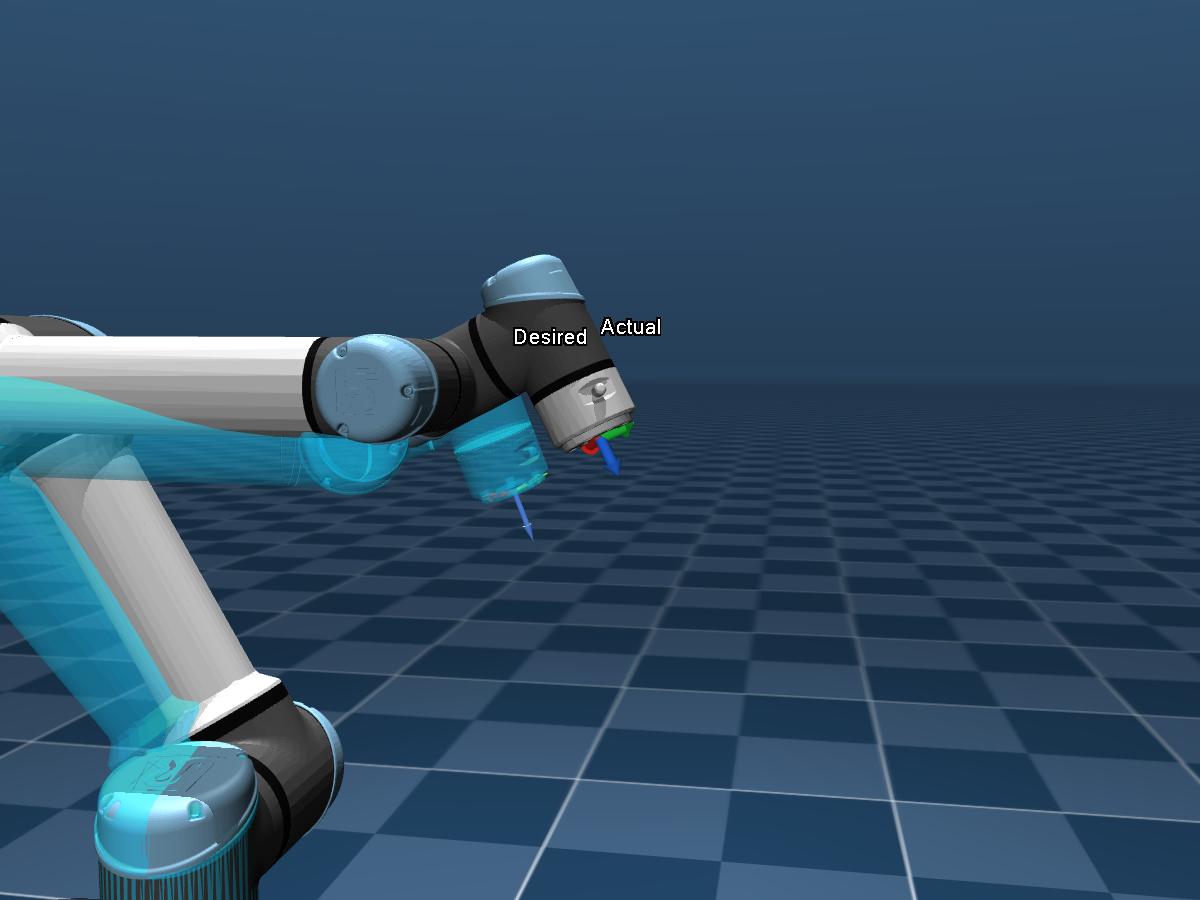
| Small RGB axes labelled Actual | Wrist pose from measured joints; 7 cm arrows. |
| Thin, lighter RGB axes labelled Desired | Mapped wrist target before IK; 10 cm arrows. Joint-only policies use command FK. |
The solid robot follows feedback as the normal control pipeline runs. The
overlay is only a visual comparison. On Tianji, it covers the active arms and
their hands; the inactive side remains visible in the solid scene. The cyan
command overlay clears during startup, idle, shutdown, and fault. Returning to idle
uses the amber preview described below. --headless omits the viewer.
See policy deployment and preview
for DP/ACT launch commands and controls.
The wrist axes use red for X, green for Y, and blue for Z. They use the same configured wrist frame, including the UR5e wrist-to-tool rotation. A difference between the desired target and actual feedback remains visible even when IK cannot reach the requested pose. Tianji labels each selected wrist by side. Actual axes appear after the first joint feedback; desired axes clear during startup, idle, shutdown, and faults, alongside the cyan command preview.
#Return to idle
Press b while teleoperating or paused to return to the configured idle pose. The viewer automatically shows an amber tool path for each active arm and a transparent amber robot at the final arm and finger pose. The solid robot continues to show measured feedback.
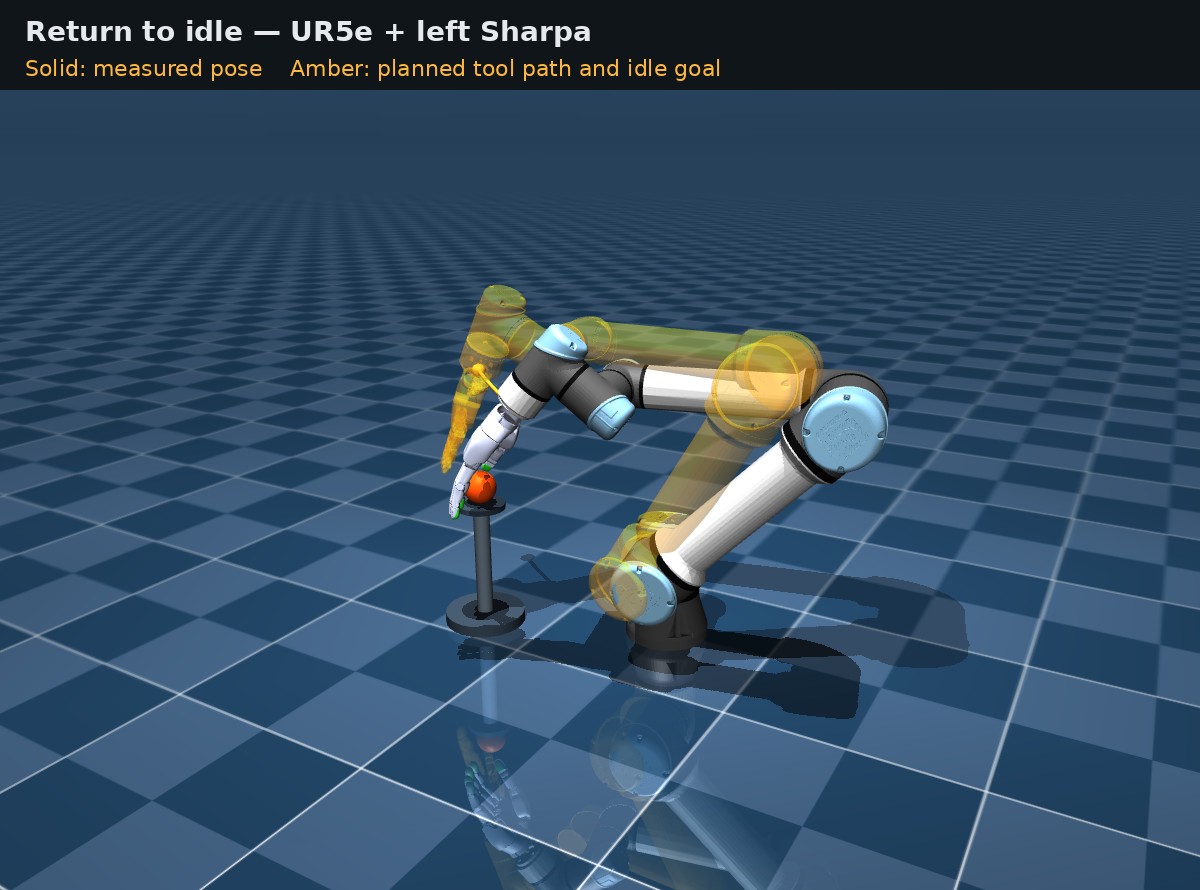
The preview uses samples of the controller's existing return ramp, starting from the same measured joint snapshot and respecting the configured arm and finger speed limits. It displays the planned motion for simulation, dummy, and hardware sessions through the shared viewer. Tianji shows one path per active arm, with the idle goal mesh covering those arms and their hands.
The amber preview clears when the return ramp completes, or when another
stage interrupts it, including a fault. A normal c shutdown also shows
the preview during its parking step. No additional key or preview command is
needed; --headless omits the viewer. This is a kinematic visualization of
the planned motion and does not send actuator commands.
#Logs and diagnostics
dmani, dmani-ur5e, dmani-sim, tianji, dmani-replay, and dmani-record run
automatically save each run under out/runs/ and print its directory.
The normal console shows startup progress, state changes, recording status,
warnings, and faults with one timestamp and node label per line.
Add --verbose to show runtime details and enable DEBUG logs from local
Python nodes and Python/Loguru dependencies. Use --log-dir PATH to choose
the parent directory for new run archives.
uv run dmani-sim --robot ur5e --input mock --headless --duration 3
uv run dmani-sim --robot ur5e --input mock --headless --duration 3 --verbose
Each archive contains the complete emitted output in run.log, searchable
line records in events.jsonl, config.yml, dataflow.yml, and run.json
with the run's start/end times and exit code. Hardware runs automatically save
command/target and measured joint-position streams under out/recordings/;
run.json includes their recording_dir. Recording sessions also store
the corresponding run ID and directory.
Repeated identical warnings are summarized on the console every five seconds and at exit. Every occurrence stays in the archive; errors and fault details are always shown without deduplication. Unknown SDK output and tracebacks are kept visible. The capture includes emitted messages; collecting dependency DEBUG messages requires verbose mode.
Errors and tracebacks are red in an interactive terminal; warnings are yellow.
Redirected output and run archives remain plain text. Set NO_COLOR=1 to
disable terminal colors. If Dora reports that a node has exited with an error,
the launcher stops the entire run automatically and returns a nonzero exit code.
It first requests graceful shutdown, then bounds cleanup with termination if a
process does not exit. Ordinary safety-fault logs retain the existing latched
FAULT behavior. The first failed node and the runtime exit status are recorded
in run.json.
--print-dataflow prints only YAML and creates no run archive. Direct
uv run dora run ... commands retain Dora's original console and log behavior.
#UR5e robot
configs/ur5e_arm.yml describes a six-joint UR5e
with zero hand joints. Its graph omits the glove reader, GHR Tracker/Retargeter,
hand commands, hand readiness gate, and hand driver. The shared Vive mapper,
IK solver, session state machine, command safety gate, and timing remain the
same for every sink.
# Synthetic wrist, interactive MuJoCo preview:
uv run dmani --robot ur5e --input mock

# Live Vive, MuJoCo arm:
uv run dmani --robot ur5e

# Device-free MuJoCo check; exits after eight seconds of TELEOP:
uv run dmani-sim --robot ur5e --input mock --headless --duration 8

# Full hardware graph with an echo arm; no RTDE connection:
uv run dmani --robot ur5e --mode dummy --input mock --headless --duration 8

# Live Vive, physical UR5e:
uv run dmani --robot ur5e --mode hw
For physical hardware, clear the workspace and keep the emergency stop ready.
The driver first enables a measured-pose hold. Press y only after checking
readiness, wait for IDLE, then press a to engage. --auto and --headless
are rejected for the real hardware backend.
Both dmani --robot ur5e and dmani-sim --robot ur5e default to simulation. The mapper,
IK, state manager, replay source, and safety checks stay shared across MuJoCo,
dummy, and RTDE; backend selection changes the sink and its feedback.
The implementation lives in:
configs/ur5e_arm.yml: theur5erobot, with no hand joints.src/core/robots/registry.py: registered robot names and config selection.src/core/robot_cli.py: the common robot launcher.src/core/robots/ur5e/launcher.py: the shared UR5e graph builder.src/core/vive/recording.py: wrist trajectory and rig-snapshot storage.src/core/vive/preview.py: the preview and Space-controlled recorder UI.
See the parity audit and implementation validation below.
#UR5e hard joint limits
configs/ur5e_arm.yml owns the arm bounds. Hand rigs reuse them through
arm_config: ur5e_arm.yml:
ik:
  joint_limits_deg:
    shoulder_pan_joint: [-30.0, 30.0]
    shoulder_lift_joint: [-150.0, -68.0]
    elbow_joint: [80.21409131831524, 137.50987083139756]  # [1.4, 2.4] rad
    wrist_1_joint: [-143.2394487827058, -80.21409131831524]  # [-2.5, -1.4] rad
    wrist_2_joint: [-120.32113697747289, -57.29577951308232]  # [-2.1, -1.0] rad
The bounds are [minimum, maximum] in degrees. Wrist 3 retains its original
URDF limits. The IK optimizer uses the intersection with the URDF ranges, and
its final float32 output is clamped inside those bounds before publication and
before saving the next warm start. The shared simulator and driver command gate
rejects targets outside the configured ranges, latching FAULT and holding
measured joints.
Startup allows a measured pose that is already outside these software bounds.
The hardware holds that pose until y confirms the rate-capped ramp to idle.
During BRINGUP, an out-of-range joint may hold or move toward its range, but
cannot move farther outside. Once a joint's target enters the range, it cannot
leave again. This exception ends when BRINGUP ends; parking, shutdown, and
live IK use the configured bounds. Jump, speed, finite-value, and expiry checks
remain active throughout recovery. The same command gate handles simulation
and hardware.
Startup, idle, shutdown, simulation initialization, and the IK rest pose share
the configured default pose:
[0.232, -120.093, 120.351, -117.108, -93.253, 54.217] degrees. The YAML pose
arrays store radians. Configuration loading rejects saved destination poses
outside the custom bounds before a dataflow can start; startup recovery applies
to measured hardware poses. Restart a stopped dataflow after changing the
limits; they are not hot-reloaded.
UR5e rigs also share a wrist-height guard in configs/ur5e_arm.yml:
safety:
  wrist_height:
    min_z_m: 0.20
    soft_min_z_m: 0.30
    weight: 1000.0
Heights refer to ik.ee_link (ee_link for UR5e) in ik.base_link
(base_link) coordinates, in metres. Below 0.30 m, IK adds the residual
weight * max(0, soft_min_z_m - wrist_z); the least-squares optimizer squares
this residual. At or above 0.30 m it contributes zero. The requested wrist
pose is not clamped, so this soft penalty trades off with pose tracking.
The shared command gate rejects joint targets and each interpolated output
whose FK wrist height is below 0.20 m. Measured feedback below the boundary
also latches FAULT. Logs identify WRIST_HEIGHT_LIMIT, the sample type, wrist
link, base frame, height, and threshold. Fault handling holds the measured
joint pose, including an already-low measured pose; it never automatically
lifts or parks the arm. Simulation and physical drivers apply the same rule.
Configured idle, rest, simulation-initial, startup, and parking poses must satisfy the hard minimum. Live UR5e startup checks measured height before opening the control interface and again before its first servo hold. Unlike angular-limit recovery, a startup pose below this floor is refused.
The optional block is absent in older configurations; absent or null keeps
height protection disabled. Restart after editing it. The IK startup log
prints the active thresholds. The live arm command speed remains governed by
arm_hw.max_joint_vel_rps (currently 3.0 rad/s), independently of this guard.
This is a model-based wrist-point limit: finger extension, hand orientation,
tracking error, and physical stopping distance still determine table clearance.
Older recordings retain their captured settings. To apply these current limits and poses to an older UR5e recording, explicitly select the current rig:
uv run dmani --robot ur5e --config configs/ur5e_arm.yml --replay out/vive-recordings/<take>This also selects the current rig's calibration and alignment settings. These joint bounds constrain commanded angles; they do not model the wall geometry or certify collision clearance for every tool or trajectory.
#Record a Vive trajectory and replay the arm
The standalone recorder starts no Dora robot graph and no actuator driver:
uv run vive-recordIt defaults to the ur5e config and displays the live tracker pose, trail,
tracking health, recording state, frame count, and output directory. Press
Space once to begin and again to stop and save. Closing the window while a
take is active also saves it when at least two valid poses were captured.
Recenter and trail clearing affect only the display; saved poses stay in the
same filtered Z-up, metre, xyzw bus frame used by live teleoperation.
Each new out/vive-recordings/<timestamp>/ directory contains:
trajectory.npz   timestamps and T_wrist poses, directly accepted by replay
config.yml       UR5e rig snapshot with resolved scene and IK paths
recording.json   tracker serial, sample count, duration, units, and source
Replay loads the current rig selected by dmani.env, including its tuned
initial pose, alignment, safety settings, and hardware configuration. Use
--recorded-config to select the take's saved config.yml, or --config to
select another YAML. Always replay in simulation first:
# Visual simulation; wait for IDLE and press a.
uv run dmani --robot ur5e --replay out/vive-recordings/<take>

# Automatic bounded check without a window.
uv run dmani --robot ur5e --replay out/vive-recordings/<take> --headless

# Identical controls with the non-connecting hardware dummy sink.
uv run dmani --robot ur5e --mode dummy --replay out/vive-recordings/<take>
Only after those checks, set the correct TCP/payload in the selected rig config, inspect the trajectory workspace, enable UR remote-control mode, and run:
uv run dmani --robot ur5e --mode hw --replay out/vive-recordings/<take>Hardware replay cannot run automatically or headlessly. It holds the measured
pose until y, moves through the configured bringup to IDLE, and waits for
a. The first recorded wrist pose is clutched to the current arm pose, so
replay reproduces relative wrist motion through the mapper and IK; it never
sends recorded joint commands directly.
#Vive input smoothing
Live Vive position and orientation use adaptive One Euro filtering before wrist mapping and IK. Teleoperation in simulation and on hardware, the wrist preview, heading calibration, and live wrist recording share the same reader. Position and quaternion components have separate filters per tracker; quaternions follow the shortest hemisphere and are normalized after filtering.
Set the filter in configs/ur5e_arm.yml for all UR5e rigs or
configs/tianji.yml for Tianji:
tracker:
  one_euro:
    min_cutoff: 5.0
    beta: 0.5
    d_cutoff: 1.0
min_cutoff is the cutoff in Hz at low speed; lowering it gives more smoothing
and lag. beta raises the cutoff with movement speed; zero gives a fixed cutoff.
d_cutoff smooths the derivative estimate in Hz. The filter uses actual elapsed
sample time. These settings replace tracker.smoothing_alpha; old configs
without one_euro load the defaults above. Values originally tuned in joint
space may need adjustment for wrist position and orientation.
Preview and recording accept --min-cutoff, --beta, and --d-cutoff overrides.
Saved recordings include the effective settings. Tracking loss clears filter
history, and jump detection still checks the unsmoothed position. Recorded wrist
poses are already filtered and replay does not filter them again.
The shared teleop mapper also caps the mapped end-effector's 3D translation
speed before IK. Set teleop.max_ee_linear_speed_mps in the rig configuration;
the default is 1.2 m/s for live Vive, simulation, and replay. Fast targets
are approached over later samples while teleoperation remains active. The cap
resets at engagement and pause/resume calibration, so moving the tracker while
disengaged does not create catch-up motion. Recorded T_wrist retains the
filtered input and T_ee shows the capped target. Orientation and acceleration
are not limited by this setting; the existing raw wrist snap safety stop and
arm joint command checks still apply.
#Calibration
#1. Vive heading calibration
Start SteamVR, stop teleoperation, and open the live calibration program:
uv run calibrate
# Tianji: choose the arm supplying the shared room-heading reference.
uv run calibrate --config configs/tianji.yml --side right
Hold the mounted tracker/hand in the displayed default pose. Press Space to select the current live frame, move the wrist to check the mapped target, then Enter to save. T changes the tracker forward axis; E changes the tool axis. R selects again and Q cancels. The window waits and reconnects if the tracker is temporarily disconnected.
Saving updates teleop.wrist_to_robot_rpy_deg in the rig config and creates
a backup. Restart the dataflow to use the new heading. Normal engagement and
pause/resume retain this heading while resetting the wrist pose anchor.
See the live heading calibration guide for the
complete workflow, axis conventions, and saved settings.
#2. Camera extrinsic calibration
Use an arm-only hand-eye-calib recording to fit the two ZED left-eye
camera-to-base transforms and inspect the saved result with uv run dmani-extrinsics.
See the camera extrinsic calibration guide
for capture requirements, commands, and validation.
#UR5e simulation with live Vive and Wuji glove
Use the live Vive tracker and left Wuji glove to control the simulated UR5e and left Sharpa hand (22 DOF):
cd /home/weison/dynamic-mani
uv run dmani
Start SteamVR with the Vive tracker paired and tracking. Power on and connect
the left Wuji glove so the Wuji SDK can discover it. Live finger tracking
requires a left-hand Wuji calibration for the wearer, selected through
hand_retarget.params_path. A desktop display is required for MuJoCo and
keyboard input. Set tracker.serial in the rig config if several trackers
are present. See the Vive setup guide for tracker setup.
Wait for IDLE, hold your wrist at a comfortable starting position, then use:
- a — engage, pause, or resume teleoperation.
- b — park at the idle pose.
- c — park and shut down.
The command uses the hand selection saved in configs/ur5e_sharpa.yml. To
restore the left default after switching hands, stop the dataflow and run
uv run python scripts/select_hand.py --config configs/ur5e_sharpa.yml --hand sharpa --side left,
then launch again. Switch the UR5e hand describes the
other selections. The glove side follows the selected hand automatically.
#Ball-throwing task in MuJoCo
UR5e teleop defaults to the robot and standard background in simulation,
dummy, and hardware. Simulation task objects are opt-in: --scene loads the
configured sim.scene_xml, and --scene PATH.xml loads a specific scene.
dmani-sim accepts the same option. Hardware and dummy viewers always show
only the robot.
The optional UR5e hand task has a ball on a pickup stand and an open basket. Use the live tracker and glove to grasp the ball, lift it, then throw it toward the basket and open the fingers to release it.
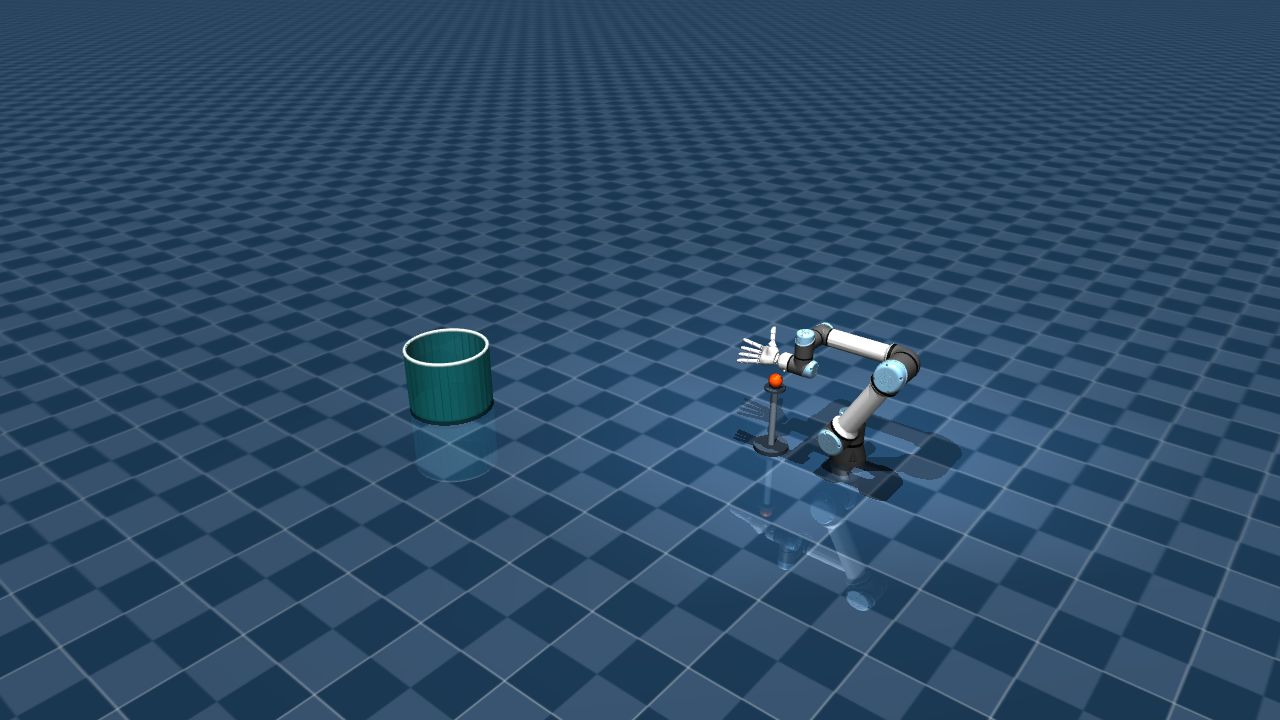
MuJoCo scene at the configured idle pose. The orange ball is directly below the palm; the teal basket is 1.5 m forward from that hand position.
- Ball: 3 cm radius (6 cm diameter), 50 g mass.
- Pickup position: ball center 10 cm vertically below the idle palm, held at that height by a small stand.
- Basket: 1.5 m horizontally from the idle palm to the basket center, pointing away from the arm base. The opening is 36 cm across and the basket is 30 cm high, resting on the ground.
The ball responds to gravity and contacts with the fingers, stand, floor, and basket. Its motion is streamed to the Viser viewer.
#Run and reset the task
With SteamVR, the Vive tracker, and the selected Wuji glove ready:
uv run dmani --robot ur5e-sharpa --scene
# Explicit scene file:
uv run dmani --robot ur5e-sharpa --scene assets/ur5e_sharpa_left.xml
# Mock input with the same task scene:
uv run dmani --robot ur5e-sharpa --input mock --scene
Wait for IDLE, then press a to engage. Press a again to pause or
resume robot motion. To reset the ball to its stand, press c to shut down,
then run the command again. Pausing holds the robot while the ball continues
moving under gravity. The mock-input graph in Start here can
also display this scene without devices.
#Change the task settings
Edit this block in configs/ur5e_wuji.yml:
sim:
  throwing:
    enabled: true
    ball_radius_m: 0.03
    ball_mass_kg: 0.05
    ball_below_hand_m: 0.10
    basket_distance_m: 1.5
    basket_inner_radius_m: 0.18
    basket_height_m: 0.30
Keep the other existing sim settings in the same block. Stop the dataflow
and rebuild after changing these values or the default hand/arm pose:
uv run python scripts/build_scene.pyThen restart the simulation with --scene. Omit --scene to return to
robot-only teleop; no rebuild is needed for the robot-only view.
#Optional Newton backend and Sharpa tactile
Existing launch commands still use the saved rig and MuJoCo. The new dmani-sim
command defaults to MuJoCo, with no hand override and no tactile output. Newton
requires --mode newton; a Sharpa override requires --hand sharpa.
Selections apply only to that launch: the launcher creates a config and scene
under out/, preserving the saved rig, original scenes, and later launches.
Install the optional runtime once, then start a device-free interactive run:
uv sync --project environments/newton --locked
uv run dmani-sim --mode newton --hand sharpa --side right --tactile --input mock
Press a to engage/pause/resume, b to park, and c to shut down. The 3-D window displays Newton's measured state and free objects. A second window shows the five Sharpa fingertip heatmaps. Select normal force, shear magnitude, or pressure using the dropdown. Colors use a fixed scale across pads and frames; readings clear after 0.5 seconds without updates. Close the heatmap window to hide it; the simulation continues.
| Launch choice | Arguments |
|---|---|
| Current saved rig in MuJoCo | uv run dmani-sim |
| Newton with the current saved hand | uv run dmani-sim --mode newton |
| Sharpa for this run, MuJoCo physics | uv run dmani-sim --hand sharpa --tactile |
| Live Vive + glove, Newton + right Sharpa | uv run dmani-sim --mode newton --hand sharpa --side right --tactile |
| CUDA instead of Newton's default CPU device | Add --device cuda:0 |
| Automatic mock run with viewers | Add --input mock --auto --duration 8 |
| Automatic run without viewers | Add --input mock --headless --duration 8 |
| Save state, commands, objects, and touch | Add --record or --record out/my-new-capture |
| Inspect the graph without starting it | Add --print-dataflow |
--input live is the default for UR5e; it reuses the existing Vive/glove → GHR →
mapper/IK → orchestrator pipeline. --input mock needs no devices. Automatic or
headless runs require mock input. --tactile requires explicit --hand sharpa;
Wuji has no simulated tactile pads. --side requires --hand and defaults to
the currently selected side. UR5e + Sharpa hardware uses the common dmani
launcher; standalone hand output uses dmani-hand.
Tianji + Sharpa hardware remains blocked.
For Tianji, retain its assembled model and select active arms using --arm-mode:
uv run dmani-sim --config configs/tianji.yml --arm-mode right \
  --mode newton --hand sharpa --tactile --input mock
Tianji uses five pads per selected hand, with left then right for bimanual mode.
Its live input remains the existing Vive wrist source with mock finger commands.
The established uv run tianji command keeps its current defaults.
#Tactile data and interpretation
Following ~/DexCube, forces from the native Sharpa elastomer collision meshes
are projected onto each fingertip's local X/Z plane. The default grid is 16 × 16
(--tactile-resolution 2..64). Bilinear projection conserves normal force and
shear magnitude. Contacts outside a pad's projected bounds remain in the contact
and load streams and are counted separately; they are not clamped onto an edge.
This is a rigid-contact estimate, rather than an optical sensor or a simulation
of elastomer deformation.
All three optional streams are flat float32 arrays, emitted at 50 Hz of simulation time. Frames contain zeros when contact is absent. Pad order is thumb, index, middle, ring, pinky for each selected hand.
| Topic | Reshape / contents |
|---|---|
hand_tactile |
[pads, 3, resolution, resolution]: normal N/taxel, shear magnitude N/taxel, pressure Pa |
hand_tactile_loads |
[pads, 10]: world force XYZ (N), world shear XYZ (N), total normal N, total shear N, off-pad normal N, off-pad shear N |
hand_tactile_contacts |
[contacts, 13]: pad index, pad-local XYZ (m), world XYZ (m), world force XYZ (N), normal N, shear N, other geometry ID in the scene model |
Each frame carries sim_time_sec and sim_backend metadata. When recording,
session.json includes the pad names, dimensions, units, bounds, taxel areas,
column names, and backend. Normal and shear values are force magnitudes; their
sums include multiple contacts. Pressure is normal force divided by taxel area.
The dashboard displays pressure in kPa; the topic carries Pa.
#Newton runtime and checks
Newton runs in environments/newton/.venv, with its own committed uv lockfile.
The root environment retains its existing dependencies. Following DexCube,
Newton 1.6 uses SolverMuJoCo: MuJoCo-C on CPU, MuJoCo-Warp on CUDA. The normal
Viser viewer renders streamed state; it does not advance Newton physics.
The first CUDA launch can spend several minutes compiling kernels before Dora
reports ready. CPU needs no CUDA device. The adapter preserves the source scene's
joint/actuator mapping, initial pose, collision gaps and contact damping, and
checks those mappings at startup. All targets retain the existing CommandGate
limits, expiry checks, PAUSE handling, and latched safety faults.
# Full device-free run with tactile recording.
uv run dmani-sim --mode newton --hand sharpa --tactile \
  --input mock --headless --duration 8 --record

# Projection, launcher, and unchanged-MuJoCo checks.
uv run pytest tests/test_tactile.py tests/test_sim_cli.py

# Newton physics, safety, contact forces, and selected-arm isolation.
PYTHONPATH=src uv run --project environments/newton --locked pytest tests/test_newton_sim.py#Tianji simulation: bimanual, left, or right
Open the complete Tianji guide for controls, configuration, tracker selection, topic shapes, and troubleshooting.
uv run tianji --arm-mode bimanual
uv run tianji --arm-mode left
uv run tianji --arm-mode right
Every command above uses MuJoCo simulation, mock wrists, and Sharpa hands. No robot, glove, or tracker connection is required. Bimanual mode controls 14 arm joints and 44 finger joints; either single-arm mode controls seven arm joints and its matching 22-DOF hand. The inactive arm and hand stay visible at their idle targets. Active fingers slowly open and close after engagement.
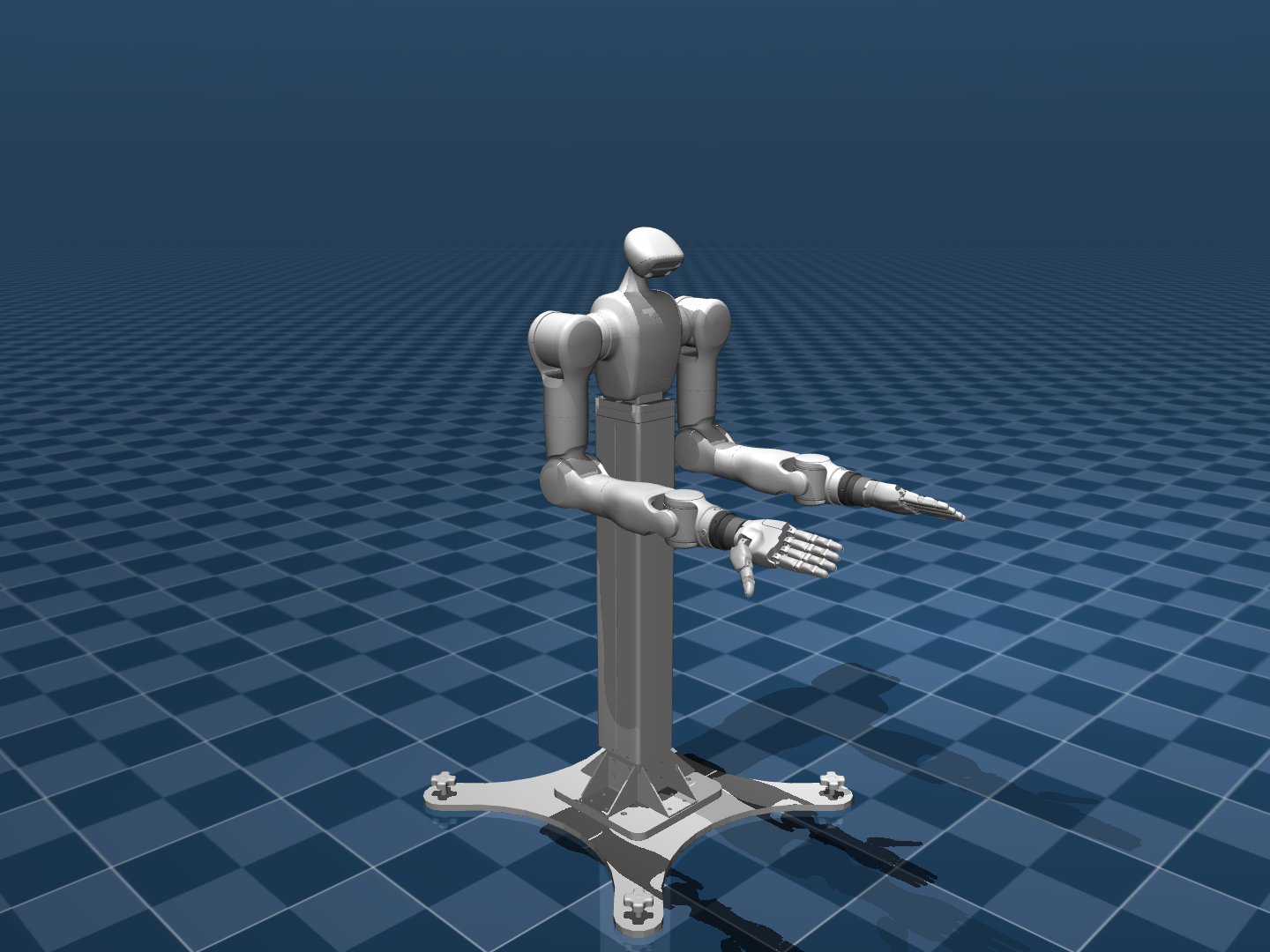
Wait for IDLE. Press a to engage, pause, or resume, b to park, and
c to park and shut down. The mock wrists move only while engaged.
For an automatic run without a desktop display:
uv run tianji --arm-mode bimanual --headless --duration 8
uv run tianji --arm-mode left --headless --duration 8
uv run tianji --arm-mode right --headless --duration 8
Use --auto --duration 8 to keep the viewer open during an automatic run.
Use --input vive to drive the same simulator with real wrist trackers;
configure tracker.serials.left and .right in configs/tianji.yml first.
Bimanual Vive input requires two distinct tracker serials.
The launcher selects configs/tianji.yml. An explicit --config or inherited
DMANI_CONFIG overrides that path. Mode precedence is --arm-mode, then
DMANI_ARM_MODE, then tianji.arm_mode. Restart the graph to change modes.
Inspect the resolved graph without starting it:
uv run tianji --arm-mode right --print-dataflowThe mapper, IK, orchestrator, and command topics are shared across simulation
and the optional SDK adapter. The adapter is selected only with an explicit
--mode hw; the commands in this section use simulation.
On 2026-09-15, all 81 project tests passed and all three arm modes completed
automatic simulation sessions through shutdown. Hardware was checked with a
fake SDK; no physical robot was connected.
#Regenerated Sharpa video
Watch or download the Sharpa video · Open the interactive 3D viewer
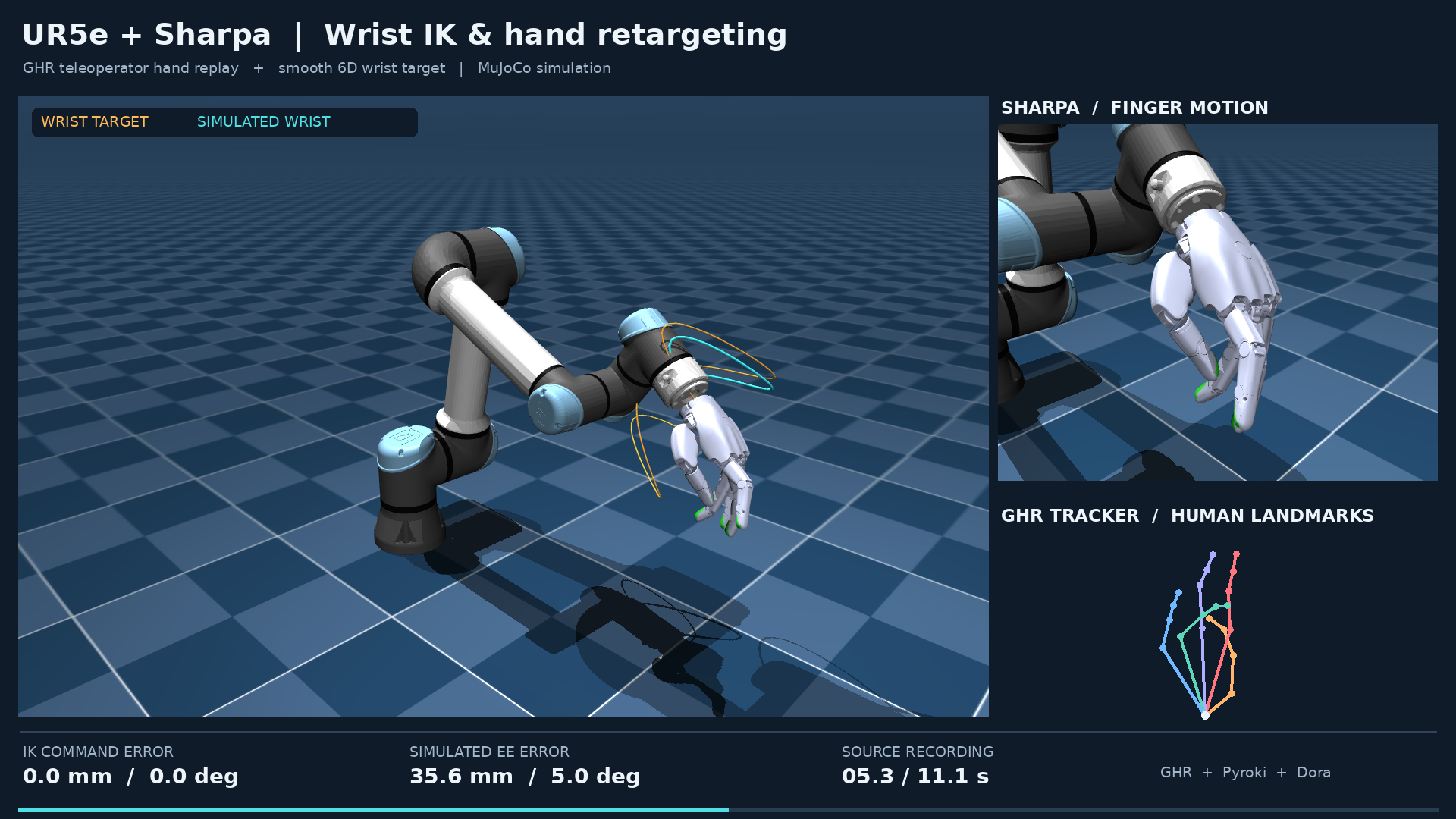
This recorded demo uses GHR's left Sharpa profile and all 22 hand joints.
To reproduce it, first select --hand sharpa --side left using the switch command below.
Regenerate the full video with the same wrist scale as the previous demo:
uv run python scripts/record_ik_demo.py --wrist-scale 1.5 --output out/ik_demo_sharpaThe completed output is out/ik_demo_sharpa/ur5e_sharpa_ik_demo.mp4: 1920×1080,
30 FPS, 409 video frames (13.63 seconds), from all 500 original glove frames
and 1,362 telemetry samples. poster.png, config snapshots, and provenance
are saved alongside it. The earlier Wuji captures remain in their own folders.
#Explore the full Sharpa 3D trajectory
Open the interactive trajectory for the complete recorded demo. The standalone Viser viewer includes all 1,362 samples over 13.61 seconds, the UR5e and left Sharpa visual meshes, recorded finger motion, source hand landmarks, and the target/IK/simulated wrist paths. It runs in the browser without a Python server or login.
Use the bottom playback controls to pause, seek to a time, or change playback speed. Drag to orbit, scroll to zoom, and use the scene tree to hide individual paths or source landmarks. The corner readout follows the viewer's playback cursor and reports the selected sample and wrist errors in millimeters/degrees. Amber denotes the wrist target, cyan the simulated wrist, and purple the IK command. The separate colored skeleton shows wrist-centered source landmarks.
The robot moves from captured joint states; the wrist input in this capture is
a generated smooth 6D trajectory. The viewer does not run IK again or simulate
new dynamics. This capture uses wrist scale 1.5 with no added wrist noise,
and replays all 500 original glove frames through the GHR Tracker and Retargeter
using the active teleoperator selection. Wrist errors use the IK end-effector
frame and include pipeline latency, as described below.
To record and rebuild the published demo:
uv run python scripts/record_ik_demo.py --wrist-scale 1.5 --output out/ik_demo_sharpa
uv run --with viser==1.1.0 python scripts/export_ik_trajectory.py --capture out/ik_demo_sharpa --output out/ik_trajectory_web_sharpa
The exporter writes trajectory_3d.html, trajectory_summary.json, and
third_party_licenses.txt. It retains every timestamp and the full visual
meshes. The summary records source/capture/model hashes, sample count, duration,
and tracking metrics without local filesystem paths or participant names.
Open the HTML locally to preview. Publish the three export files with the
rendered usage guide as index.html, plus the capture's
ur5e_sharpa_ik_demo.mp4 and poster.png, under dynamic-mani/. Check every
new or changed file's exact size against the site's publishing limit before upload.
#Prepare the environment and assets
Use uv sync for the environment, uv run for commands, and uv add for
dependency changes. Keep pyproject.toml and uv.lock together when updating
dependencies. Python must satisfy the project's >=3.11,<3.13 requirement.
The current checkout uses external GHR packages caliber and retarget as
editable path dependencies. Their locations are defined in
[tool.uv.sources] in pyproject.toml. Ensure those source directories exist
before synchronization. GHR algorithms remain in that external checkout.
The repository includes robot assets. Rebuild them only when setting up
missing assets or deliberately refreshing their source models. Set UR5E_SRC
to the source universal_robots_ur5e directory and WUJI_SRC to the source
wuji-description/hand/body-with-soft directory if overriding the script defaults:
uv run bash scripts/vendor_assets.sh
uv run python scripts/fetch_ur5e_urdf.py
uv run python scripts/build_scene.py
uv run pytest
Sharpa model data is vendored under assets/sharpa_hand/ and
assets/sharpa_hand_description/. SHARPA_ASSETS_SRC can select another
local archive containing those directories. The active hand_retarget.data_root
is the project root (.), while GHR algorithm packages remain external.
The vendoring script replaces assets/ur5e_mjcf/ and assets/wuji_hand/;
preserve intentional local model edits first. It expects both sides of the Wuji source in urdf/, mjcf/, and meshes/,
plus the upstream license.
The active combined scene is assets/ur5e_sharpa_left.xml, with all 22 left
Sharpa hand joints. UR5e hand mount positions and angles are defined on the
sharpa_mount_site and wuji_mount_site sites in assets/ur5e_mjcf/ur5e.xml
(relative to wrist_3_link; metres and wxyz quaternions). After changing a
mount, rebuild the scene with
DMANI_CONFIG=configs/ur5e_sharpa.yml uv run python scripts/build_scene.py.
The separate assets/ur5e/ur5e.urdf sets the IK end-effector frame.
Preview the generated scene without starting the control pipeline:
uv run python -m mujoco.viewer --mjcf=assets/ur5e_sharpa_left.xml#Switch the UR5e hand
Stop the dataflow, select the model and side, then restart it:
uv run python scripts/select_hand.py --config configs/ur5e_sharpa.yml --hand sharpa --side left
# Omitting --side retains the saved left side:
uv run python scripts/select_hand.py --hand sharpa
uv run dmani
The selection persists in the active rig YAML; dmani.env currently selects
configs/ur5e_sharpa.yml with left Sharpa and the left Wuji glove.
The command builds the matching scene and updates dimensions, joint order,
idle hand pose, GHR robot profile, glove side/calibration, and driver together.
It preserves arm settings and saves a .yml.before-hand-switch backup.
Use --config for another UR5e rig YAML and --params /path/to/params.json for
a different Wuji glove calibration. Each side is stored separately in
hand_retarget.params_paths. The supplied calibrations belong to the previous
wearer; calibrate a new wearer in GHR. Explicit hand poses in bringup/shutdown
must be changed to idle before switching models or sides.
The same selection applies to live-input simulation and hardware. UR5e + Sharpa and the standalone dmani-hand command share the vendor Sharpa SDK adapter. Tianji + Sharpa remains limited to simulation and dummy output.
#Select the shared configuration
The active rig is selected by DMANI_ROBOT / DMANI_CONFIG in the shell or
dmani.env, with command-line overrides. This selection is shared by the pose
editor, live runs, and replay. The built-in fallback is configs/ur5e_wuji.yml;
the tianji family launcher defaults to configs/tianji.yml.
Use an absolute DMANI_CONFIG path to select another configuration consistently
across a dataflow:
export DMANI_CONFIG=/absolute/path/to/dynamic-mani/configs/my_setup.ymlRelative asset paths resolve against the parent of the directory containing
the configuration file. Keep alternate files in the repository's configs/
directory, or use absolute paths for sim.scene_xml, ik.urdf, and other
asset locations. Restart the graph after changing the configuration.
Use the hand-switch command to keep hand_retarget.robot/side,
hand_hw.backend/side, the scene, and joint dimensions aligned. Both live
UR5e graphs use a thin local glove adapter that sets GHR's HAND_SIDE from
this shared config; no graph edits are needed when changing sides.
hand_retarget.ghr_root selects external hardware scripts.
hand_retarget.data_root selects GHR robot assets, and
hand_retarget.params_path selects the wearer's glove calibration.
hand_retarget.modeling must match the calibration's anatomy. Explicit
MR_DATA_ROOT and GLOVE_MODELING environment values take priority over the
corresponding configuration defaults. The live graphs also contain the GHR
glove script path; update both if relocating the checkout.
#Visualize the teleop default pose
Use dmani-pose to open a Viser view of the saved teleop idle pose.
It loads idle.arm_q and idle.hand_q through the same configuration loader
as teleoperation. The Arm and Hand folders contain joint-angle sliders in
degrees, initialized at those saved values. Arm sliders use the intersection of
configured IK action limits and model actuator/joint limits; hand sliders use
the model actuator/joint limits. Tune UR5e arm slider bounds in
ik.joint_limits_deg in configs/ur5e_arm.yml. Dragging a slider updates
only the preview; it neither saves the pose nor sends robot commands. No
tracker, glove, or running dataflow is needed.
# Use the robot/configuration selected in dmani.env:
uv run dmani-pose

# UR5e arm only:
uv run dmani-pose --robot ur5e

# UR5e with the saved Wuji hand configuration:
uv run dmani-pose --robot ur5e-wuji

# UR5e with the saved Sharpa hand configuration:
uv run dmani-pose --robot ur5e-sharpa

# Tianji with both arms, or one active arm and its hand:
uv run dmani-pose --robot tianji-sharpa --arm-mode bimanual
uv run dmani-pose --robot tianji-sharpa --arm-mode left
uv run dmani-pose --robot tianji-sharpa --arm-mode right
For a particular rig file, use --config. To preview any UR5e hand variant,
select the hand rig explicitly and override its hand for this preview:
uv run dmani-pose --config configs/ur5e_arm.yml

uv run dmani-pose --config configs/ur5e_wuji.yml --hand wuji --side right
uv run dmani-pose --config configs/ur5e_wuji.yml --hand wuji --side left
uv run dmani-pose --config configs/ur5e_wuji.yml --hand sharpa --side right
uv run dmani-pose --config configs/ur5e_wuji.yml --hand sharpa --side left

uv run dmani-pose --config configs/tianji.yml --arm-mode right
The last Sharpa command displays the UR5e + left Sharpa assembly at its
configured teleop default. Hand overrides use the existing hand-selection
and scene builder, keeping the saved rig and model files unchanged. Their
temporary preview files are removed when the preview stops. Use --config
for these overrides; a supplied --robot name must match the resulting rig.
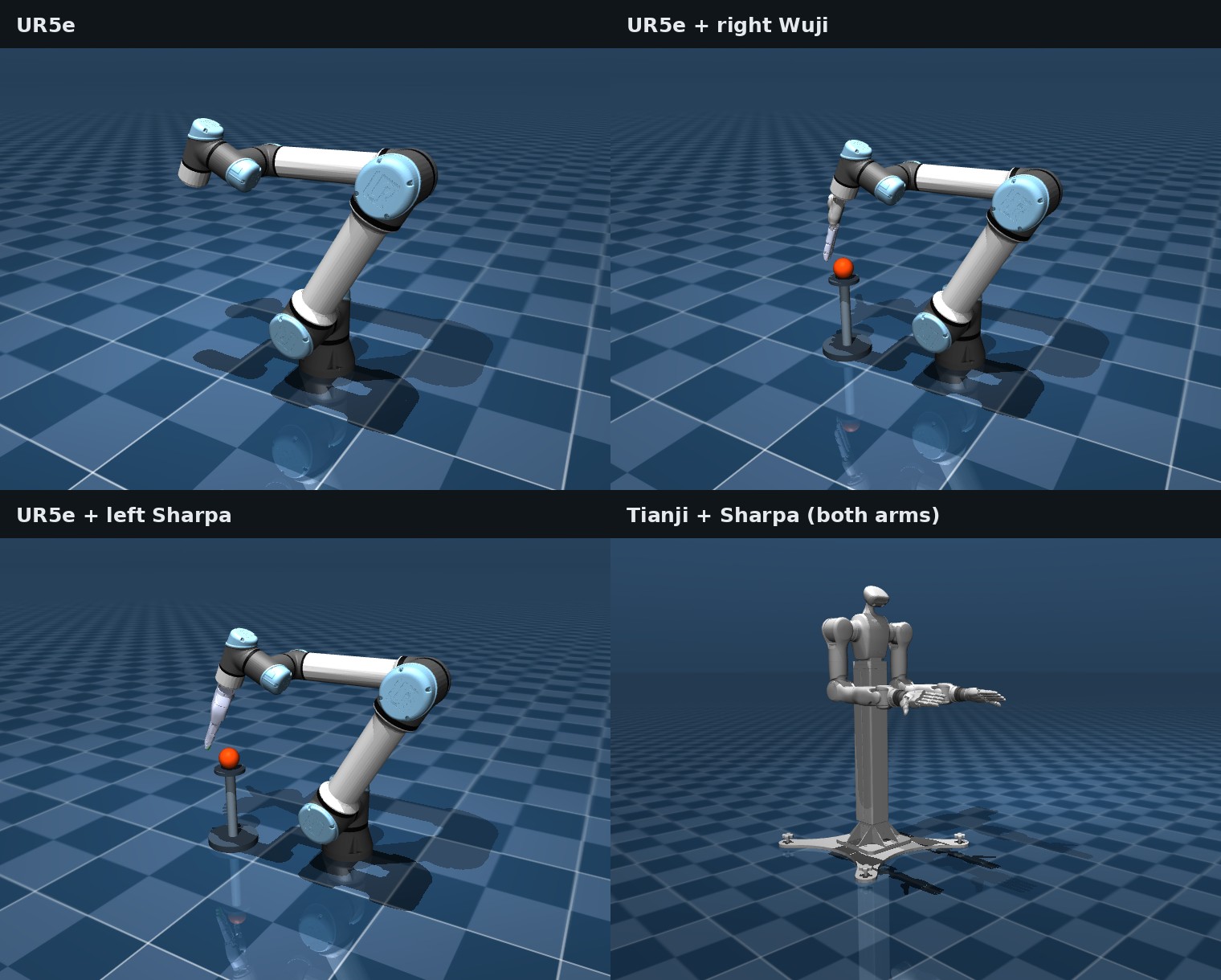
The command prints a local URL; open it manually, or set
DMANI_VIEWER_OPEN_BROWSER=1 to open it automatically. Drag to rotate,
right-drag to pan, and scroll to zoom; press Ctrl+C in the terminal to stop
the server. Use --viewer mujoco for the desktop MuJoCo window, which needs a
display and working OpenGL and closes with Q or Esc. Joint sliders update
the preview through kinematics without stepping physics, sending actuator targets,
or editing the saved pose. On Tianji, the inactive arm and hand remain visible at their
configured idle positions.
CLI selection overrides the shell and dmani.env, as it does for teleop.
The command prints the selected configuration and arm angles in degrees.
UR5e hand rigs read their shared arm pose from configs/ur5e_arm.yml.
To change that saved pose, use the initial-pose editor.
Loading an XML directly with python -m mujoco.viewer does not load the rig's
teleop idle values. During teleop, b also displays the
trajectory back to idle automatically in the running viewer.
#Move UR5e with Viser joint sliders
uv run dmani-move             # MuJoCo; --mode dummy uses the SDK-free driver
uv run dmani-move --mode hw   # Physical UR5e
Stop the other arm dataflow, open the printed Viser URL, and press y on the keyboard to confirm measured-pose startup. The arm then returns slowly to the saved default pose. The solid mesh and current-angle table show measured joints; the translucent cyan mesh previews the six desired joint angles in degrees. Drag the sliders, then click Send command to move to that selected pose. Later slider edits change the preview until another command is sent.
Moves use max_joint_vel_rps from the shared arm config, currently 0.1 rad/s
(about 5.7°/s), with the same cap in the sink's command gate. Pause holds
measured joints, Resume continues toward the submitted target, and
Return to default parks at the saved pose. Shut down parks when healthy;
a latched safety fault disables without parking. The keyboard controls remain
a pause/resume, b return to default, and c shut down.
The tool follows the active UR5e rig's arm_config, or --config PATH, and
controls only its arm. Sliders respect configured/model joint limits. It uses
the same source, state manager, and safety gates for simulation, dummy, and
hardware. The saved configuration and default pose stay unchanged.
#Set the initial arm pose
The walkthrough below uses the six-joint UR5e rig. For the supplied Tianji
configuration, edit the full 14-joint vectors in configs/tianji.yml and
restart the launcher. The editor requires inline YAML lists and matching
full-rig joint names; saving a projected single-arm Tianji pose is unsupported.
# Load and tune the saved default pose for ur5e:
uv run python scripts/set_initial_pose.py --config configs/ur5e_arm.yml

# Load and tune the saved default pose for ur5e-wuji:
uv run python scripts/set_initial_pose.py --config configs/ur5e_wuji.yml
The pose tuner selects the robot through --config; it does not currently
accept --robot. Omitting --config resolves DMANI_CONFIG / DMANI_ROBOT
from the shell and dmani.env, just like live runs and replay. Each robot keeps
its own saved default pose, and both tuning and launch commands print the
selected config path.
This opens a Tk control panel and a live MuJoCo preview. A desktop display,
working OpenGL support, and Tk support in the selected Python are required.
The preview starts from idle.arm_q and displays the configured idle hand.
- Move the six joint sliders or type angles in degrees. The preview updates when all entries are finite and within their model joint limits.
- Inspect the full arm and mounted hand, including clearance around the wrist and work surface. The preview directly positions joints; it does not certify a collision-free path to the pose.
- Click Save pose or press Ctrl+S. The editor writes the same six
angles, in radians, into
sim.init_arm_q,idle.arm_q, andik.rest_pose, preserving other values and YAML comments. - Restart the matching robot, for example
uv run dmani --robot ur5eoruv run dmani --robot ur5e-wuji. Simulation automatically loads the saved pose; the configured bringup sequence moves to idle, andbreturns to idle later. If you edited a custom config, launch with--configpointing to it.
Every save replaces the adjacent .yml.bak file with the configuration as it
was immediately before that save. The three pose fields must be separate
inline YAML lists without aliases, in joint_names.arm order.
Reset to opening pose restores the values loaded when the editor opened; save again if you want that reset written to disk. Close or Esc exits without saving additional edits. Closing does not undo a previous save. The editor operates only on the preview and configuration.
#Record live teleoperation
Hardware teleoperation, replay, and policy runs record automatically by default
without a recording flag, including the direct teleop_hw.yml graph. The
session manifest is created at launch, but samples are saved only during TELEOP
intervals opened by a. UR5e + Sharpa hardware also automatically records
wrist + ZED; the wrist captures at 90 FPS and saves 640 × 480 RGB at 30 FPS.
Use --record PATH --no-cameras to choose a new telemetry directory, or
--record for live-input camera presets on other rigs. Simulation and dummy
CLI runs remain opt-in. See camera settings and dataset timing.
To disable session recording:
uv run dmani --robot ur5e-sharpa --mode hw --no-recordThis skips the session recorder, recording cameras, and Sharpa tactile
acquisition and missing/expired-frame checks. It creates no session archive;
diagnostic logs remain in out/runs. Keyboard y, measured-pose startup,
and joint-command safety checks remain active. The flag also works with
dmani-ur5e, tianji, dmani-hand, and dmani-replay; it conflicts with
--record and --camera. Omit it to restore automatic hardware recording.
--no-cameras alone still records telemetry and requires tactile feedback.
The shared recorder captures inputs, commands, actuator targets, measured joints, and state/safety events for UR5e and Tianji. a begins/ends each take; y keeps and x excludes the completed take while IDLE or PAUSE. Data stays local regardless of review. Startup confirmation still uses y during BRINGUP.
uv run dmani-record run --headless --duration 8
uv run dmani-record run --input vive
uv run tianji --record
The output folder is named from the local session start time, for example
out/recordings/2026-09-16_19-08-05.123456-0700/. The launcher prints its path.
Use that path with uv run dmani-record inspect PATH.
For a recorded session, run uv run lerobot PATH to review RGB and fingertip
tactile data, mark each take, and save the kept takes as a LeRobot v3 dataset.
See Session recording for the complete workflow, file format, review commands, failure behavior, and recovery.
#Replay captured sessions
uv run dmani-replay out/ik_demo_sharpa --recorded-config
uv run dmani-replay out/ik_demo_sharpa --recorded-config --headless --speed 0.5
uv run tianji --arm-mode bimanual --headless --duration 8 --record out/tianji_capture
uv run dmani-record export out/tianji_capture --episode 1 --output out/tianji_episode_1
uv run tianji --replay out/tianji_episode_1 --headless
Session replay defaults to MuJoCo and sends saved wrist/hand inputs through the
shared mapper, GHR hand retargeter, arm IK, and orchestrator. It uses the same
active rig and tuned pose selected by dmani.env as the pose editor. Use
--recorded-config to select the neighboring saved config.yml, or --config
to select another YAML. Use a to engage/pause/resume, b to park and rewind,
and c to shut down. When replay reaches its end, it holds the final arm and
hand commands and keeps the program open. Press b to return to the configured
default pose and reset playback to the first frame. Once parked, the robot is
in the same ready IDLE state as startup; press a to replay again.
--auto engages the first pass automatically and keeps keyboard controls.
--headless omits the viewer and keyboard; it also holds at the end until the
process is stopped.
--speed sets a positive playback multiplier; --start/--end select original
frames by source seconds. Every selected input frame is processed, so slow solves
can extend playback time. Input NPZ files need increasing time and T_wrist
arrays. UR5e hand replay also needs raw_device_data or
hand_keypoints/keypoints; Tianji wrist-only captures replay with idle Sharpa
hands. Recordings with finger input use the matching GHR adapter for each hand.
Joint commands alone are insufficient. Standalone GHR glove/bone files still use
the IK-demo command below. Raw glove sessions need their matching calibration.
Tianji recording and arm selection are described in the Tianji guide. A new recording directory holds a session manifest and separate TELEOP episode folders; startup, idle, and pause samples are not saved. Export a selected episode to NPZ before replay; older NPZ captures remain supported. Each episode replays from the configured idle pose. Source replay recomputes control outputs; measured joints can differ with timing, solver settings, or the selected sink.
#Record an IK demonstration
The demo replays GHR teleoperator's active motion selection alongside a
generated smooth wrist trajectory. It needs no connected tracker, glove, or
robot, but does need the external GHR checkout, its motion recording,
calibration/correction files, and robot assets. The recorded hand side must
match the selected rig hand. For the published left Sharpa recording, select
--hand sharpa --side left first.
uv run python scripts/record_ik_demo.py --wrist-scale 1.5By default, the recorder uses GHR's centralized source, person, modeling,
optimizer, and hand selectors, matching uv run teleoperator in the
GHR checkout. The robot comes from hand_retarget.robot in the rig config
(sharpa in the current setup), rather than GHR's ROBOT selector. GHR's active hand side
must match the configured side. The adapter validates the robot and canonical
joint order against GHR before sending commands.
The recording's calibration is resolved separately from the rig's live Wuji
glove calibration; do not reuse a Manus calibration for live Wuji input.
To select a particular recorded glove motion and output directory:
uv run python scripts/record_ik_demo.py --recording /absolute/path/to/glove-motion.npz --output out/ik_demo_run_01 --wrist-scale 1.5An explicit trusted .pkl file selects legacy bone replay instead. Pickle
loading can execute code. A bone export must contain at least two frames with
strictly increasing finite t timestamps, finite left_fingers arrays of
shape (21, 3) in GHR's MediaPipe-21 order, and a consistent optional
left_frame value of raw or wrist (default raw).
Use a fresh output directory for each capture: recording overwrites the config snapshot, metadata, log, and telemetry, and rendering overwrites the video, poster, and metric summary. A failed run can leave a mixture of old and new artifacts in a reused directory.
The recorder snapshots the selected config and effective retargeter settings,
resolves the scene and IK URDF to absolute paths, sets CPU JAX execution, and
launches dataflows/demo_replay_mujoco.yml. After bringup and command readiness
it automatically engages, holds the first source frame for 1.5 seconds, and
plays every original input frame once. Each frame waits for the preceding
retarget result, preserving GHR's warm state and filter history. The wrist
trajectory follows the acknowledged source time. The graph requests shutdown
after the last result and a one-second hold. The wrapper has a 210-second
timeout; recording progress is written to run.log.
--wrist-scale scales both translation and rotation amplitudes of the
generated wrist motion; the script's default remains 0.8. The published
run explicitly uses 1.5. GLOVE_FPS controls nominal glove playback rate
(default 45); --fps controls video sampling (default 30), not physics or IK
rates. Slow retargeting can extend wall-clock capture duration.
--wrist-noise adds smooth random wrist-position offsets in meters per axis
(default 0.0). --noise-seed and --noise-interval control the reproducible
noise sequence. The current published run has no added noise. Inspect target
errors when changing the idle pose or increasing the motion amplitude.
#Render or inspect an existing capture
Capture without rendering, then render later:
uv run python scripts/record_ik_demo.py --output out/ik_demo_run_01 --record-only
uv run python scripts/record_ik_demo.py --output out/ik_demo_run_01 --render-only --fps 30
Use one mode flag at a time. --render-only needs an existing config.yml
and trajectory.npz in the selected output directory. It uses that saved
configuration; changing the live config or passing a new recording does not
change an existing capture. Scene and URDF paths in the snapshot must still
be accessible. The snapshot does not copy the external models themselves.
For a quick rendering check:
uv run python scripts/render_ik_demo.py out/ik_demo_run_01 --fps 30 --max-frames 60This creates preview.mp4, but also replaces poster.png and metrics.json
in that directory. Render the full capture again to restore full-video
metadata. Error statistics still use the full telemetry even when the video
is shortened with --max-frames.
Rendering defaults to EGL (MUJOCO_GL=egl) and expects DejaVu Sans fonts
under /usr/share/fonts/truetype/dejavu/. On a workstation with a working
display, an explicit MUJOCO_GL=glfw selects the window-system backend.
The renderer repositions the model using captured simulated joint states;
it does not solve IK again or generate new control commands.
#Find the outputs and interpret errors
The default output directory is out/ik_demo/. A completed capture and full
render produce:
trajectory.npz— elapsed time, source time, source landmarks, target end-effector poses, arm/hand commands, gated actuator targets, and simulated arm/hand joint states, recorded during teleoperation.config.yml— the run's configuration snapshot, with absolute model paths.metadata.json— source provenance and SHA-256, wrist-source code hash, graph name, hand selection, and wrist scale.hand_commands.npz— each original source frame index and its retargeted hand command, used to check complete source playback.retargeter_config.json— effective GHR settings for glove-mode captures.run.log— the recording process's combined output and diagnostics.- MP4 — a 1920×1080 video, 30 FPS by default, showing the full arm, hand
close-up, source landmarks, and target-tracking errors. Its current filename
is fixed in
scripts/render_ik_demo.pyeven when--recordingchanges. poster.png— a representative rendered frame.metrics.json— mean, 95th-percentile, and maximum errors, sample count, capture duration, and rendering metadata.
The video uses a generic GHR teleoperator replay label. Identify the actual input using the source path and hash in local metadata. Source selection, calibration/correction hashes, and the effective retargeter configuration hash are recorded for glove-mode captures.
IK command error compares forward kinematics of arm_joint_cmd with the
latest T_ee target. Simulated end-effector error makes the same comparison
using arm_joint_state. Position error is a Euclidean distance in millimeters;
orientation error is the relative rotation angle in degrees. Summary errors
exclude the initial engagement hold using time >= 1.5 seconds.
Signals are captured as their latest available values, so both measurements include pipeline latency. The simulated error also includes actuator dynamics and command gating. These diagnose one simulated trajectory; they are not synchronized solver residuals, finger-quality metrics, or hardware measurements.
#Live Wuji glove → GHR → Sharpa hand
Run the hand-only pipeline from dynamic-mani. dmani-hand reads the saved
Sharpa rig, acquires the Wuji glove, calls GHR's Tracker and Retargeter, and
sends the resulting 22 joint angles through the shared state manager and
command safety gate. Simulation and hardware use the same upstream Dora
graph; only the output sink changes. No arm or Vive input is started.
The commands below inherit the saved left glove and hand; no --side flag is needed. Read-only SDK heartbeat
discovery identified the replacement LEFT hand as serial C957923CC955 at
192.168.10.10 on 2026-09-24. The config pins that serial and keeps the
working IP; the old and new hands have different MAC addresses. Discovery does
not confirm motor readiness.
# Live Wuji glove → GHR → standalone Sharpa in MuJoCo:
uv run dmani-hand

# The same input and controller → physical Sharpa:
uv run dmani-hand --mode hw
Both commands need the matching live glove and wearer calibration. Settings
come from configs/ur5e_sharpa.yml, including the selected side's
hand_retarget.params_paths, modeling, and hardware addresses. Pass
--config to read another Sharpa rig, --params /path/to/params.json for a
different wearer, or --side right for the matching right glove and hand.
The supplied Wuji calibrations belong to the previous wearer. The saved left
calibration lacks its instance bone-roll artifact, so GHR currently logs a
warning and uses the robot profile's correction. Side selection applies only
to this session and does not rewrite the saved arm rig.
Wait for measured feedback, then press y to confirm startup and move to
the hand's idle pose. At IDLE, press a to engage glove control; a
also pauses and resumes, b returns to idle, and c parks and shuts down.
A safety fault stays latched; c then disables directly without parking.
These controls and transitions are identical in simulation and hardware.
Hardware startup enables a measured hold before y; confirmation permits
the idle ramp. The added Sharpa finger joint-position rejection is disabled
in simulation, dummy, and hardware, including startup and TELEOP. Hand shape,
finite-value, speed, expiry, and feedback checks remain active, as do arm limits.
GHR and simulator model limits are unchanged. Real sessions record automatically;
--no-record skips session saving and tactile acquisition/checks while retaining
diagnostic logs.
Hardware prerequisite: hand_hw.sdk_root points to
/home/weison/robot_api/sharpa_sdk_5.0.7 for the current left hand with firmware
3.0.6. This SDK delivered fresh RAW, DEFORM, and F6 data on all five fingertips
during a sensor-only check. The older SDK 5.0.1 stalled on the pinky; SDK 5.0.11
rejected tactile startup because this firmware lacks the distributed_force
configuration key. The Python adapter requires the actual
lib/libsharpa-wave-sdk.so, python/sharpa/__init__.py, and the matching
CPython extension (for this environment, sharpa.cpython-312-x86_64-linux-gnu.so).
These Python 3.12 binaries are present locally. The separate
libSharpaWaveSDKWrapper.so is not a dependency of the Python binding and is
neither required nor preloaded. Preflight rejects missing binaries and Git LFS
pointers, and checks the host route without executing the native SDK.
Use --sdk-root /path/to/sdk for another installation with its lib/ and
python/ directories.
The adapter has been tested with fake devices; physical actuation has not
been tested. The same adapter supports the combined UR5e + Sharpa rig;
Tianji + Sharpa hardware remains blocked.
The UR5e, left Sharpa hand, and left Wuji glove connect to one Ethernet switch.
Its PC uplink is enp129s0 (MAC 34:5A:60:51:51:D3) using the persistent
Robot Switch NetworkManager profile. The interface carries three static
addresses, so each device retains its existing subnet:
| Device | PC address on enp129s0 |
Device address |
|---|---|---|
| UR5e | 172.22.22.1/24 |
172.22.22.2 |
| Left Sharpa hand | 192.168.10.240/24 |
192.168.10.10 |
| Left Wuji glove | 192.168.1.10/24 |
192.168.1.100 |
All three answered ping through this uplink on 2026-09-22; UR5e ports
29999 and 30004 also accepted zero-payload TCP handshakes. The profile provides
no default route; internet access stays on Wi-Fi. Sharpa's interface, host
address, and per-side device addresses are saved under hand_hw.
The old USB profiles Sharpa Hand, Wuji Devices, and Wired connection 1
are retained with autoconnect disabled to avoid duplicate addresses/routes.
The connectivity dashboard uses the same switch uplink and selects each
subnet's source address when pinging.
For a bounded rehearsal without devices, replace the input with mock motion:
uv run dmani-hand --side left --mode sim --input mock --headless --duration 2
uv run dmani-hand --side left --mode dummy --input mock --headless --duration 2
Add --print-dataflow to inspect either live graph without launching it.
#dmani-hand command API
uv run dmani-hand starts live Wuji input with MuJoCo output. The command
reads configs/ur5e_sharpa.yml by default; --config selects a different
UR5e + Sharpa rig whose hand settings can be extracted for this session.
| Option | Default | Behavior |
|---|---|---|
--mode sim/dummy/hw |
sim |
MuJoCo, an SDK-free dummy sink, or the physical Sharpa SDK sink. |
--input wuji/mock |
wuji |
Live glove through GHR, or scripted joint motion without glove acquisition or GHR. |
--side left/right |
Saved rig side | Selects the matching glove, calibration, model, and device address for this run. |
--config PATH |
configs/ur5e_sharpa.yml |
Reads hand, retargeting, and safety settings from this rig. |
--params PATH |
Selected side's saved calibration | Uses a matching Wuji glove params.json for this wearer. |
--sdk-root PATH |
hand_hw.sdk_root |
Directory containing the vendor's native lib/ and python/ files. |
--headless |
Off | Runs an automatic, bounded mock session without a viewer; requires --input mock and sim or dummy. |
--duration SECONDS |
8 |
Teleoperation duration for the automatic headless session; must be finite and positive. |
--print-dataflow |
Off | Builds and prints the selected graph without launching nodes or hardware preflight. |
--verbose |
Off | Shows detailed runtime and node logs. |
--log-dir PATH |
out/runs |
Parent directory for run diagnostics. |
--backend aliases --mode; dry-run and hardware alias dummy
and hw. Use uv run dmani-hand --help for the installed command's options.
--duration does not impose a time limit on an interactive live session.
For example, select a calibration and inspect the real-output graph without starting it:
uv run dmani-hand --side left --params /path/to/wuji/left/params.json \
--mode hw --print-dataflow#Active GHR profile
With the current saved left Sharpa rig and no explicit GHR environment overrides, simulation and hardware resolve the same live profile:
| Setting | Resolved value |
|---|---|
| Glove source and side | Wuji, left |
| Runtime glove model | 3-2-1-thumbCMCBottom-conjRPsoft |
| Robot retargeting profile | /home/weison/GHR/retarget/config/retargeter/robot/sharpa/sharpa_bone_same_left.yaml |
| Runtime retargeting optimizer | MinkVectorOptimizerBoneSingleStage |
| Saved calibration method | autodiff_t3_scale_cem_recon |
| Calibration file selector | hand_retarget.params_paths.left, or --params for this run |
| Output | Left Sharpa, 22 joint angles in the configured canonical order |
The calibration method describes how the saved glove parameters were fitted;
the runtime robot optimizer is Mink. The saved calibration directory retains
the older 3-2-1-thumbCMCBottom-conjRPsoftMcpRoll name, while the configured
runtime model is the value listed above. The missing instance bone-roll
artifact causes the documented fallback to the robot profile's correction.
The rig selects the robot, side, and explicit calibration path. GHR's
resolve_cfg("sharpa", "left") selects the robot YAML; changing only
GHR's default person or robot in ghr.env does not replace those explicit
rig selections. GLOVE_PARAMS, GLOVE_MODELING, RETARGETER_CONFIG, and
RETARGETER_OPTIMIZER in the process environment can override the
corresponding defaults. The adapter validates the chosen robot and joint
order against the rig. Startup logs print GHR robot config: and
GHR Tracker params: with the actual resolved files.
#GHR and dynamic-mani API boundary
GHR owns glove tracking and hand retargeting. Its tracker.track.Tracker
recovers human hand landmarks, and retargeter.Retargeter maps those
landmarks to Sharpa joints. Dynamic-mani's adapters call these Python APIs
inside the Dora nodes.
Dynamic-mani owns configuration, node orchestration, the shared
Orchestrator state machine, CommandGate safety checks, recording, and
the output sinks. The physical sink calls the vendor SharpaWave SDK directly.
The launcher starts this graph:
Wuji glove → GHR Tracker → GHR Retargeter → state manager → command gate → sink
                                                                          ├─ MuJoCo
                                                                          ├─ dummy hand
                                                                          └─ Sharpa SDK
For live input, changing --mode preserves the glove source, GHR adapter,
state manager, and command topics. Feedback returns from the selected sink
to the state manager and viewer. Startup confirmation, engagement, measured
pause, return to idle, and latched faults use the same session controller.
The numeric Dora payloads are flat float32 arrays:
| Topic | Logical shape | Meaning |
|---|---|---|
raw_device_data |
(2, 6, 7), 84 values |
Normalized glove measurements; left is row 0 and right is row 1. |
tracked_keypoints |
(1, 21, 3), 63 values |
Selected hand's MediaPipe-21 landmarks in the wrist frame. |
hand_joint_cmd |
(22,) |
GHR's requested Sharpa joint positions in radians. |
hand_joint_target |
(22,) |
State manager target passed to the sink's command gate. |
hand_joint_state |
(22,) |
Measured joint positions from the selected sink. |
Joint arrays follow the rig's joint_names.hand order, checked against
GHR's canonical Sharpa order and the SDK adapter's joint order. Source
timestamps remain in Dora metadata so delayed glove commands can expire.
#Python integration helpers
The launcher helpers live in core.robots.sharpa.hand_cli:
selected_config(path, *, side=None, params=None, sdk_root=None)is a context manager yielding(RobotConfig, runtime_yaml_path). It extracts one hand, builds the standalone MuJoCo model, and writes a temporary session YAML. The YAML exists for the context's lifetime; the saved rig is preserved.build_dataflow(cfg, *, backend="sim", source="wuji", headless=False, duration=8.0)returns the Dora graph dictionary. It accepts exactly one 22-DOF Sharpa hand with zero arm joints and does not launch the graph.
For example, inspect a simulation graph from Python:
uv run python - <<'PY'
from pathlib import Path
import yaml
from core.robots.sharpa.hand_cli import build_dataflow, selected_config

with selected_config(Path("configs/ur5e_sharpa.yml"), side="left") as (cfg, path):
    graph = build_dataflow(cfg, backend="sim", source="wuji")
    print(yaml.safe_dump(graph, sort_keys=False))
PY
The node adapter RigHandRetargeter(cfg, input_mode="glove") in
nodes.hand_retarget.core accepts step(values) with shape
(2, 6, 7). For this standalone rig it returns 22 float32 joint angles,
or None when it cannot produce a valid frame. Its last_keypoints holds
the corresponding (1, 21, 3) landmarks. The CLI sets GLOVE_SOURCE=wuji
for its live input and retargeting processes.
nodes.sharpa_hand_driver.core.preflight(cfg) checks the rig, native
SDK files, host route, and local UDP joint-feedback port 50000 without loading
the SDK or enabling hardware. An occupied port is reported with its socket owner.
Use the launcher for an actuating session so targets pass through the state
manager and command gate.
#Run live teleoperation
This section covers UR5e + Sharpa/Wuji. For live Vive input controlling a
simulated Tianji, use uv run tianji --arm-mode bimanual --input vive and follow
the Tianji guide.
Real-input simulation needs SteamVR with a paired Vive tracker and a powered
Wuji glove, plus its matching wearer calibration. Set tracker.serial if
several trackers are present. The glove adapter reads the selected side from
configs/ur5e_wuji.yml (right by default). Follow the
live-input simulation quick start
for the complete setup and controls.
# Live tracker and selected-side glove; simulated robot:
DMANI_CONFIG="$PWD/configs/ur5e_wuji.yml" uv run dora run dataflows/teleop_mujoco.yml

# Live tracker and glove; dummy actuator drivers:
UR5E_DRY_RUN=1 WUJI_DRY_RUN=1 uv run dora run dataflows/teleop_hw.yml

# Fully synthetic, headless rehearsal of the dummy drivers:
uv run dora run dataflows/smoke_hw_dryrun.yml
The two *_DRY_RUN environment variables affect the robot drivers only; the live
hardware graph still needs the tracker, glove, calibration, and display.
The combined UR5e + Sharpa rig uses the same input, GHR, mapper, IK, and state manager in simulation, dummy mode, and hardware. Hardware selects the UR5e and Sharpa sinks and automatically starts wrist + ZED recording:
uv run dmani --robot ur5e-sharpa --mode hw
# Inspect the full graph without starting devices:
uv run dmani --robot ur5e-sharpa --mode hw --print-dataflow
The session is prepared at launch, but data saving starts only when a
enters TELEOP. Press y after measured feedback to allow the startup ramp,
then a at idle to engage. Pauses and return-to-idle motion are not saved.
Configured camera paths, known USB bandwidth limits, and Sharpa SDK
files/network routing are checked before nodes launch. The ZED's configured
2560 × 720 YUYV capture at 60 FPS saves the native 1280 × 720 left view at
30 FPS and requires a USB 3 data connection. Use lsusb -t to
confirm its video device is at 5000M or faster; 480M is USB 2 and cannot
carry this mode. Use a USB 3 cable and port, preferably directly on the PC.
The actual vendor SDK binaries must be installed before a live run.
--no-cameras explicitly disables camera capture while retaining telemetry
and all five physical fingertip tactile streams. Use --no-record to skip all
session saving, recording cameras, and tactile acquisition/checks:
uv run dmani --robot ur5e-sharpa --mode hw --no-recordFor the existing Wuji hardware drivers, select a matching Wuji scene, 20-joint
order, idle pose, retargeting profile, and hardware backend first. Set the UR5e address
in arm_hw.robot_ip, enable remote-control mode, and connect the Wuji hand. Clear the bringup/idle/shutdown motion area and have the robot's emergency
stop available before launching:
uv run dora run dataflows/teleop_hw.ymlWait for IDLE. Hold your wrist at a comfortable starting position and press
a: the mapper pins that tracker pose to the robot's idle end-effector pose
and blends into live commands over teleop.ramp_time_sec. Press a to pause
and hold, move your wrist to reposition comfortably, then press a to resume
from the paused robot pose. Press b to park at idle or c for the configured
shutdown sequence. These keys trigger software state transitions; c can
include motion and is not the robot's emergency stop.
#Keep simulation and hardware on the same pipeline
The two live graphs share the Vive source, glove source, wrist mapper, arm IK,
hand retargeting, and state manager. Only the actuator sinks and their feedback
connections change between MuJoCo and hardware. The state manager remains
the sole producer of arm_joint_target and hand_joint_target.
Vive wrist --> teleop_mapper --> arm_ik -------------+
Wuji glove --> GHR Tracker --> GHR Retargeter -------+
Operator keys -------------------------------------+
                                                   |
                                             state_manager
                                                   |
                            arm_joint_target + hand_joint_target
                                                   |
                              MuJoCo OR UR5e + Wuji drivers
The recording demo replaces device inputs with replay sources. Glove recordings run through the GHR Tracker and Retargeter; explicit legacy bone recordings enter the Retargeter directly. Both reuse the wrist mapper, IK, state manager, command topics, and simulator. The mock graphs instead supply synthetic joint commands for the hand.
Tianji uses core.robots.tianji.launcher.build_dataflow to generate a graph with the
same wrist and finger sources, mapper, IK, retargeting, and state manager for
every backend. Only the robot sink changes. The selected mode determines
whether each pose stream contains one or two poses, each arm stream seven or
14 angles, and each Sharpa stream 22 or 44 angles. Wrist-only replay holds
the hands idle. Physical Tianji + Sharpa hardware remains blocked; use sim
or SDK-free dummy mode.
Numeric messages are flat float32 arrays; pose messages use
[x, y, z, qx, qy, qz, qw]. When extending the system, keep shared control
logic in the same nodes for simulation and hardware, and preserve joint order
from joint_names.
#Parity audit
The parity requirement applies to anything that can produce actuator targets. CI compares the non-sink graph for the UR5e live, recording, and replay paths and rejects automatic/headless real-hardware launches.
| Feature | Simulation / preview | Dry-run | Real hardware | Status |
|---|---|---|---|---|
| UR5e live Vive + Wuji | MuJoCo | UR5e + hand echo drivers | UR5e RTDE + supported Wuji driver | Shared mapper, IK, GHR, state manager, and targets. |
| UR5e live Vive | MuJoCo | UR5e echo driver | UR5e RTDE | Shared control graph; only robot sink changes. |
| Vive trajectory replay | MuJoCo first | UR5e echo driver | UR5e RTDE with y confirmation |
Recomputes mapper and IK; no joint-command playback. |
| Session recording during control | Available | Available | Available | Recorder observes the same graph and never bypasses gates. |
| Pause, park, shutdown, faults | Exercised in sim | Exercised with fake/echo SDKs | Same state manager and CommandGate |
Hardware startup cannot be automatic. |
| Tianji selected-arm control | MuJoCo | SDK-free dummy | Arm SDK path exists | Shipped Sharpa rig blocks hardware before arm enable because no physical hand adapter exists. |
| Sharpa tactile maps | MuJoCo/Newton only | Not applicable | No sensor adapter installed | Intentional simulated-sensor feature, not a hardware control path. |
| Ball, basket, rendering, overlays | MuJoCo only | Not applicable | Not applicable | Intentional simulation-scene exception. |
| Vive preview/record and heading calibration | Actuator-free UI | Not applicable | No actuator sink | Their saved source/config can be exercised in sim before control. |
| Initial-pose editor and offline render/export | MuJoCo/offline | Not applicable | Config is consumed by both sinks | These tools do not issue actuator commands themselves. |
Any new feature that can reach a real actuator must add a sim or dummy route through the same command topics and safety gates. A hardware-only control fork is unsupported.
The implementation audit found simulation or dummy coverage for every actuator-producing feature. The intentional exceptions are simulation scenes and rendering, synthetic tactile sensing, actuator-free calibration and preview tools, and unavailable hardware adapters. Tianji + Sharpa blocks hardware before arm enable. A static scan found hardware SDK calls only in designated driver sinks.
#UR5e implementation validation
The implementation handoff recorded these results:
| Check | Recorded result |
|---|---|
| Test suite | 422 passed, 1 skipped; the skip is the isolated Newton-environment module. |
| UR5e MuJoCo smoke test | Passed. |
| Synthetic Vive trajectory replay | All 18 recorded source frames replayed through MuJoCo. |
| Dry-run replay | Passed with the non-connecting sink. |
| Hardware graph | Passed print-only validation. |
| Dependency lock | uv lock --check passed. |
| Physical devices | No physical hardware was connected or actuated during these checks. |
The existing tests/test_ur5e_arm.py covers shared control graphs across the
three sinks, six-joint/zero-hand configuration, recorder-to-replay round trips,
automatic replay config selection, and rejection of automatic hardware startup.
For a device-free graph inspection, use:
uv run dmani --robot ur5e --mode hw --print-dataflow--print-dataflow builds and prints the graph without launching its nodes.
#Troubleshoot common failures
- Sharpa reports
JOINT_POSITION_LIMITor “target is outside the hand model's joint limits”: the added position check could reject measured startup angles or near-zero retargeting output such as thumb IP-6.42028e-20against a zero lower bound. That command rejection is now disabled for Sharpa fingers in simulation, dummy, and hardware; restart the run to load the change. Arm bounds and hand finite-value, speed, expiry, feedback, and startup confirmation checks remain active. GHR and simulator model limits are unchanged. - Sharpa says “No advancing joint feedback before enable”: inspect the
earlier SDK log.
bind failed, errno: 98on UDP port50000means the local joint-feedback receiver could not bind because that port was already occupied. Find the owner withss -uanp 'sport = :50000', close that application normally, then restart. Do not run two hardware controllers for the same hand. Preflight checks this port before launching nodes and reports its owner.--no-recordskips tactile checks but still requires fresh measured joint positions. - ZED reports 15 or 30 FPS when 60 FPS is requested: check its negotiated link
with
lsusb -t. A480Mconnection is USB 2; reconnect the ZED using a USB 3 cable and port until it shows5000Mor faster. The launcher rejects known insufficient bandwidth before starting any hardware nodes. The 15 FPS device dashboard preview can work on USB 2 even though the 60 FPS HD720 capture mode cannot. - Sharpa tactile feedback is missing on channels 9–5: those are all five
left-hand fingertips. A successful motor connection does not establish tactile
reception. The timeout now includes the SDK receive summary (packet/frame
counts); inspect it alongside the tactile destination and firmware/SDK warnings.
Recorded runs require real frames from all five fingertips; use
--no-recordto skip saving and tactile acquisition/checks. GHR's hand-control adapter connects with tactile skipped by default, so that run does not test these streams.uv run sharpa_tacopens a local HTML dashboard for a sensor-only live check, with RAW and DEFORM images, F6 values, frame rates, and freshness for every finger. The URL is printed without opening a browser by default; use--browserto open it, or--duration 10for a bounded run. Stop it before teleoperation. With the Sharpa CUDA SDK and its matching CUDA, TensorRT, and OpenCV libraries available, measure all five fingertips at 180 Hz usinguv run sharpa_tac --fps 180 --sdk-root /path/to/sharpa-wave-sdk --duration 6. This sensor-only function waits 2 seconds for warmup, reports per-finger frame rates and frame ID gaps, then restores the hand's normal 30 Hz on-device mode. Keephand_hw.sdk_rootset to the standard SDK in the rig config; that SDK performs the reset in a fresh process. The 180 Hz check is terminal-only and does not change the teleoperation or recording dataflow. - Sharpa fails with an undefined
spdlogsymbol inlibSharpaWaveSDKWrapper.so: the Python binding depends on the corelibsharpa-wave-sdk.so, not the separate C wrapper. The adapter loads only the core library; remove an older loader's eager C-wrapper preload rather than adding a mismatched system logging library. The later Dora registration/channel errors are consequences of the first hand-driver failure. - GHR reports a missing instance bone-roll correction: compare the selected
calibration/modeling tuple with the working
uv run teleoperatorprofile. A legacyparams.jsonpath may select a different calibration even when the glove and hand sides match. This warning is separate from native SDK loading; do not substitute a correction artifact from another calibration tuple. - Tianji viewer cannot open on a remote/headless machine: add
--headless --duration 8; this omits the viewer and global keyboard listener. - Tianji reports a wrong rig: remove an unrelated
DMANI_CONFIGexport or pass--config configs/tianji.ymlexplicitly. - Tianji rejects bimanual tracker selection: set distinct, nonempty
tracker.serials.leftand.right; default mock input needs no trackers. - Tianji holds after a command rejection: its command guard stays latched until restart. Check the rejected values before starting a new run.
uv synccannot resolve a path dependency: check the GHR paths inpyproject.toml. Changinghand_retarget.ghr_rootalone does not relocate editable Python packages.- Scene or URDF missing: inspect
sim.scene_xmlandik.urdf, including how their relative paths resolve. Rebuild the assets if needed. - Pose editor cannot open: check the desktop session, OpenGL, and Python Tk support. The headless smoke graph does not require the editor.
- Pose editor refuses to save: supply finite angles within the displayed
joint bounds. Keep the three pose values as separate inline lists. Reopen
the editor if
joint_names.armchanged. - Recorder reports a missing recording or a hand/config mismatch: use
--recordingwith an existing compatible trusted export, and checkhand_retarget.robotandhand_retarget.sidein the selected config. - No hand commands or no TELEOP telemetry: read
run.logfor GHR asset, import, or calibration failures. On live graphs, the glove adapter derivesHAND_SIDEfromhand_retarget.sideand the physical glove; a wrong row is rejected. - Graph takes time at startup: IK and GHR initialize before the demo
engages. Inspect
run.logfor progress or errors; the wrapper times out after 210 seconds, including initialization and the recording. - Rendering fails with EGL or font errors: check the selected GL backend
and DejaVu font paths. Preserve the capture and retry with
--render-only. - Unexpected tracking errors after a pose change: inspect reachability
and joint limits, then rehearse with a smaller positive
--wrist-scale. Compare IK-command and simulated errors before changing controller gains.
#Maintain and publish this guide
Edit the maintained Markdown in docs/, then rebuild the HTML guides:
uv run --with markdown-it-py==4.2.0 --with pygments==2.19.2 python scripts/build_usage_docs.pyThe builder creates usage.html, tianji.html, vive-setup.html,
recording.html, policies.html, deploy.html, and heading-calibration.html in docs/,
with embedded styling and scripting: tables, a dark theme by default with a
light/dark toggle, highlighted code blocks with copy buttons, a guide switcher,
and a contents list that tracks the section being read. Images and videos use
the existing files beside the guides. Keep the Markdown and generated HTML
together. Update the relevant pages and README
when CLI flags, configuration keys, or dataflow wiring change.
The Meetings section has an index and one page per dated
note in docs/meetings/. The builder includes all YYYY-MM-DD.md notes in the
meeting-date navigation. Add a summary to docs/meetings/index.md for each
session and rebuild the guides with the same command.
In the canonical site's dynamic-mani/ directory, publish docs/usage.html
as index.html and the other generated HTML guides under their existing
filenames, including docs/meetings/*.html under dynamic-mani/meetings/.
Copy docs/teleop-zed-wrist.mp4 and
docs/teleop-zed-wrist-poster.jpg with the main guide. Copy
docs/act-sharpa-rollout.mp4, docs/tactile-act-sharpa-rollout.mp4, their
matching -poster.jpg files, and docs/act-tactile-act-architecture.png beside
the guides for the policy rollout demos and architecture figure. The rollout
clips retain the first half of the supplied September 30 exports at their
existing playback speed, downsampled to 640 × 360 at 15 FPS with audio.
Copy
docs/tianji-preview.png and docs/throwing-preview.png
under the same filenames when changed. Copy docs/pose-preview.jpg alongside
the guides when the default-pose comparison changes, docs/wrist-pose-preview.jpg
when the wrist-axis preview changes, and docs/idle-trajectory-preview.jpg
when the return preview changes. The throwing screenshot shows the
MuJoCo scene at the configured idle pose; recapture it after changing task
placement or the default pose.
Preserve the existing Sharpa
video, poster, interactive trajectory, summary, and license files. Deploy the
complete site with its publish.sh script after checking the exact byte sizes
of new or changed files against its publishing limit.
The main guide,
Tianji guide, and
calibration guide
require no login.
Keep these documentation pages outside reports/; preserve their existing
unlisted status and stable routes. Do not use the report-ingestion helper for
these guides, since it creates indexed report pages. All generated guides
include a noindex directive; anyone with their URLs can still open them.
The documentation uses published simulation imagery, the edited two-camera teleoperation clip, and the existing Sharpa demo assets. Raw local recordings, calibration data, config snapshots, device identifiers, and credentials are not uploaded with the guides.