Tianji + Sharpa interface
Updated: 2026-09-18
The Tianji Marvin M6-S + Sharpa assembly uses TART's
deployment/hardware/all_robots/tianji_sharpa/assets/urdf/far_dexbot.urdf
(local checkout ~/TART, revision 8cf09cd66a1a8d030af59a0d156f3b32392e8be5).
The SDK adapter and legacy arm servo gains originate in ~/teleop_prev.
The tianji launcher always defaults to MuJoCo simulation, with mock wrist
input and one 22-DOF Sharpa hand on each wrist. Bimanual mode drives both
hands; left and right modes drive the matching arm and hand.
#Command Table
#Teleoperation: UR5e and Tianji
These keys apply to interactive teleoperation and replay. The keyboard listener is global within the desktop session.
| Key | When | Action |
|---|---|---|
y |
Startup is waiting for confirmation | Confirm startup and begin the configured move to idle. |
a |
Idle | Engage teleoperation from the current wrist pose. |
a |
Teleoperating | Pause and hold the robot pose. |
a |
Paused | Resume, anchoring the current wrist pose to the held robot pose. |
b |
Teleoperating or paused | Return to the configured idle pose; replay also rewinds. |
c |
Normal operation | Park and shut down the dataflow. During startup before motion begins, cancel startup and shut down. |
c |
Fault | Shut down and disable without a parking move. |
Wait for IDLE before engaging. Use y when prompted for startup
confirmation; automatic and headless runs manage their own session transitions.
#Live heading calibration
Run uv run calibrate with teleoperation stopped, then focus the calibration window.
| Key | Action |
|---|---|
Space |
Select the current live Vive frame as the reference. |
T / E |
Cycle the tracker / tool forward axis. |
R |
Clear the reference and select again. |
Enter |
Save the heading and close. |
Q or Esc |
Cancel without saving. |
#Vive preview
Focus the vive-preview window to use these shortcuts. If a teleoperation
dataflow is also running, its global c binding will also request shutdown
when you press C to clear the preview trail.
| Key | Action |
|---|---|
R |
Recenter the displayed position; measured coordinates and world orientation stay unchanged. |
C |
Clear the movement trail. |
Q or Esc |
Close the preview. |
#Preview the default pose
View the saved teleop arm and hand pose for any Tianji mode:
uv run dmani-pose --robot tianji-sharpa --arm-mode bimanual
uv run dmani-pose --robot tianji-sharpa --arm-mode left
uv run dmani-pose --robot tianji-sharpa --arm-mode right
The preview uses configs/tianji.yml; --config path/to/rig.yml selects
another rig. The inactive arm and hand stay visible at their saved idle
positions. Drag to rotate, right-drag to pan, scroll to zoom, and Q/Esc to
close. This static view needs no tracker, glove, or control dataflow.
See the default pose chapter
for configuration selection and UR5e hand variants.
During teleop, b automatically shows an amber return path for each active arm and a transparent robot at the final idle arm and finger pose. The preview clears when the return ramp completes or is interrupted. See the return trajectory preview for the display legend.
#Run any arm mode in simulation
uv sync
uv run tianji --arm-mode bimanual
uv run tianji --arm-mode left
uv run tianji --arm-mode right
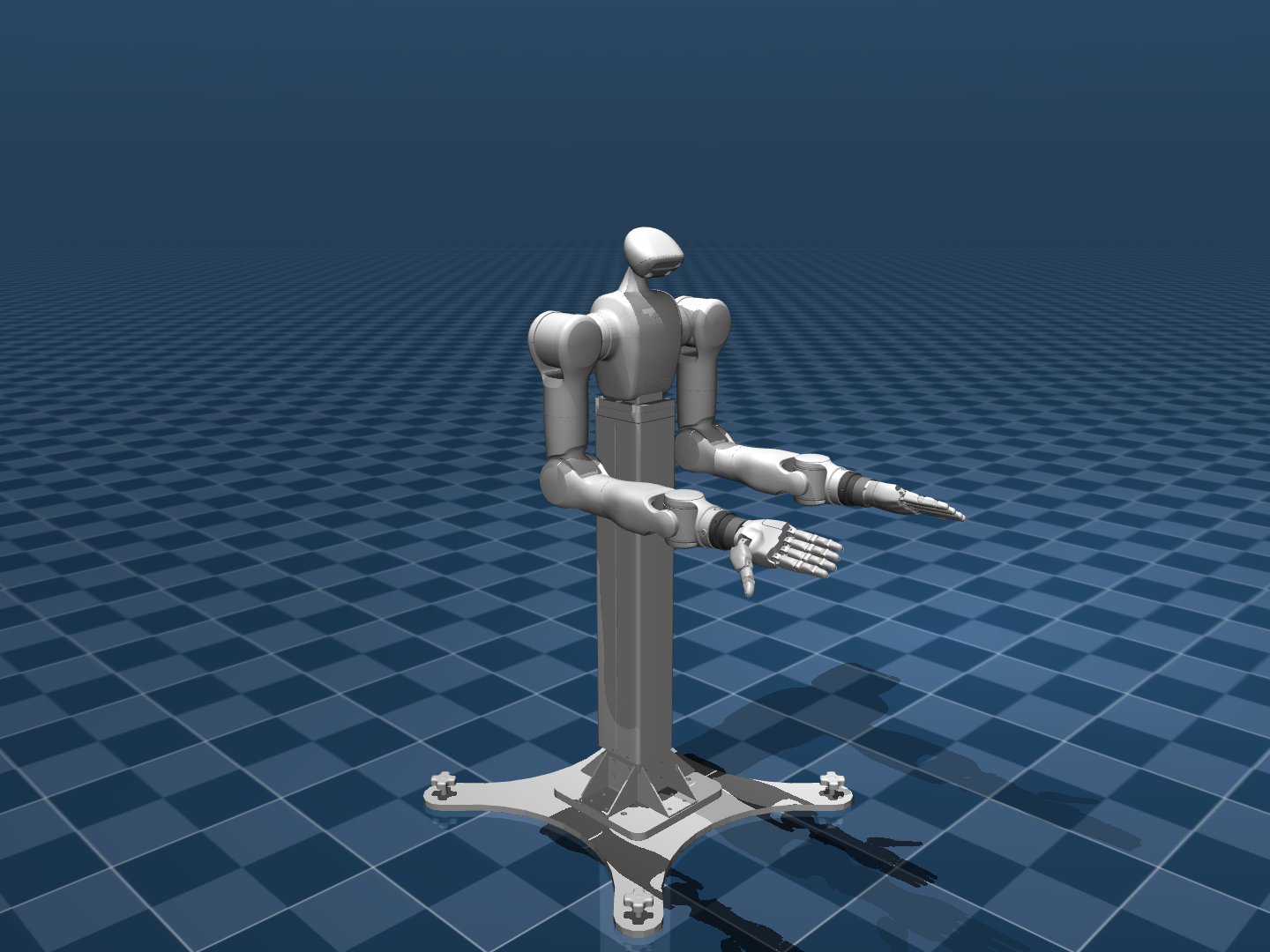
One MuJoCo window shows the assembled robot's measured arm and finger positions as solid meshes, with the latest arm IK command in translucent cyan. During teleoperation the overlay keeps measured finger angles. It covers the selected arms and hands; an inactive side remains visible in the solid scene. Use the Command Table for keyboard shortcuts.
Deploy describes deployment
with this same mesh viewer, showing both arm and finger policy targets in cyan. Select
--robot tianji-sharpa --arm-mode bimanual|left|right to match the checkpoint's rig
and active sides. Simulation remains the default.
Mock wrists trace a small mirrored circle after engagement, while the selected
Sharpa hands slowly open and close. Real Vive wrists
can drive the same simulation with --input vive. Set
tracker.serials.left and .right in configs/tianji.yml; bimanual mode
requires two distinct serials. A single-arm mode selects its matching serial.
A missing pose during teleoperation requests a pause. --input vive selects
wrist input only; fingers continue using the synthetic hand source.
Automatic simulations park and exit after the requested teleoperation duration:
uv run tianji --arm-mode bimanual --headless --duration 8
uv run tianji --arm-mode left --headless --duration 8
uv run tianji --arm-mode right --headless --duration 8
# Automatic motion with the viewer:
uv run tianji --arm-mode bimanual --auto --duration 8
--headless omits both the viewer and keyboard listener. --auto and
--headless use mock or recorded input. The normal viewer needs a desktop/display.
#Preview a live Vive wrist
uv run vive-preview --list
uv run vive-preview --config configs/tianji.yml --side left
# Or select an exact tracker independently of the rig:
uv run vive-preview --serial LHR-XXXXXXXX
The preview shows XYZ position in metres, xyzw orientation, roll/pitch/yaw, coloured axes, a motion trail, and live tracking status. R recenters the view, C clears its trail, and Q closes it. It uses the same tracker reader and Z-up coordinates as Tianji and starts no robot drivers.
Install and start SteamVR first; see the Ubuntu Vive setup tutorial
for installation, pairing, and tracker-only configuration without a headset.
Runtime initialization failures exit before opening a window. Once SteamVR is
ready, the preview waits for a connected tracker and valid poses.
--headless --duration 5 checks for real poses in the terminal;
--demo explicitly selects synthetic
motion for a viewer check. To drive the simulated robot afterward, use
uv run tianji --arm-mode left --input vive and press a once it reaches IDLE.
#Calibrate live Vive heading
With teleoperation stopped and SteamVR running:
uv run calibrate --config configs/tianji.yml --side rightHold the mounted tracker/hand in the displayed default pose. Press Space
to select the live frame, check the mapped target motion, then Enter to
save. T and E select corresponding tracker/tool forward axes.
Use --side left to take the reference from the other arm. Both arms use
the resulting room heading. Restart teleoperation after saving.
See the live heading calibration guide for details.
#Sharpa hands
The scene uses TART's complete Tianji + left and right Sharpa assembly, including the original shoulder spacing, flanges, quick changers, hand meshes, and mounting rotations. Each hand has 22 joints in GHR's canonical order. The palm sits 62.4 mm along its flange's local +Z with approximately -30° left and +30° right mounting rotation. Arm IK targets the source wrist flange; finger articulation is controlled separately. Both simulation and IK derive from the same assembled URDF.
Bimanual commands contain 44 finger angles, left then right. Single-arm commands contain the matching 22 angles; the inactive arm and hand stay parked in the complete robot scene. Engagement, pause, parking, and shutdown apply to both the active arms and their hands. All modes use the UR5e-style blue checkerboard floor and gradient sky.
Re-vendor from the local TART checkout when needed, then regenerate the models:
uv run python scripts/vendor_tianji_assets.py --source ~/TART/deployment/hardware/all_robots/tianji_sharpa
DMANI_CONFIG=configs/tianji.yml uv run python scripts/build_scene.py
This writes assets/tianji/tianji_sharpa.xml and the matching
tianji_kinematic.urdf. Vendored sources and SHA-256 hashes live under
assets/tianji/tart/. The quick-changer mesh is converted to OBJ without
removing triangles to support MuJoCo's mesh loader. Existing position gains,
GHR joint order, and internal hand collision exclusions are retained.
The default simulation needs no glove calibration. A physical Sharpa driver
is not configured.
#Record sessions and replay source motion
# Record an automatic simulation without tracking hardware:
uv run tianji --arm-mode bimanual --headless --duration 8 --record out/tianji_capture
# Record real Vive input while driving simulation:
uv run tianji --arm-mode bimanual --input vive --record out/tianji_vive_capture

# Export the first episode, then replay with a viewer; press a to begin:
uv run dmani-record export out/tianji_capture --episode 1 --output out/tianji_episode_1
uv run tianji --replay out/tianji_episode_1
# Replay only the recorded right wrist, automatically at half speed:
uv run tianji --arm-mode right --replay out/tianji_episode_1 --headless --speed 0.5
# Rehearse with the SDK-free driver sink:
uv run tianji --replay out/tianji_episode_1 --mode dummy --headless
Live Vive recordings automatically include the ZED 2i left RGB view and
RealSense D405 color view, in left, right, and bimanual modes. The defaults in
configs/tianji.yml store 256 × 256 RGB JPEG images at a requested 15 fps.
No camera depth, infrared, IMU, or point clouds are captured. Use --no-cameras
to disable them or repeat --camera NAME=SOURCE to replace the camera list.
Mock recordings and replay use cameras only when explicitly requested.
See RGB recording setup
for device paths and storage details. Physical Sharpa operation remains blocked.
--record [DIRECTORY] enables the shared session recorder.
With bare --record, the directory is automatically named from local session
start time: out/recordings/YYYY-MM-DD_HH-MM-SS.ffffff±HHMM/. The full path is
printed at launch. An explicit directory overrides the name and must be new. It saves the selected rig config and timestamped wrist
inputs, arm/hand commands and feedback, actuator targets, and state/safety events
in bounded Parquet chunks. Background periods remain in the archive. Each TELEOP
interval is a separate episode; pause-time repositioning is excluded from that
episode's replay view. Press y to keep or x to exclude the completed take;
review never deletes local samples. Export one episode to NPZ before replay.
--replay accepts an episode directory or its NPZ file and uses the active rig
and arm mode from dmani.env, including the latest tuned pose. --config
selects another YAML; --recorded-config explicitly loads the take's saved config.
A bimanual recording can drive either single arm;
its arm_sides labels select the matching source. A left-only recording cannot
drive the right arm. Each episode is re-anchored at the configured idle pose;
replay reconstructs the relative input motion through the common mapper and IK.
At the end, replay holds the final command and keeps the program open.
Press b to return to the default pose and rewind; once parked, a starts
another pass from the same ready IDLE state as startup. c shuts down.
Automatic replay keeps the keyboard when a viewer is present; headless replay
holds until the process is stopped.
The Sharpa hands stay at their configured idle pose during wrist-only replay.
Hand commands and feedback are captured; wrist-only replay does not use saved
joint commands as finger input. Older snapshots without hands still load; pass --config configs/tianji.yml to replay those wrists with Sharpa hands.
The playback clock waits for calibration and the engagement ramp, freezes on
pause, and resumes after recalibration. a pauses/resumes; b parks and
rewinds; c shuts down. End of input automatically parks and shuts down after
the final solved frame has been held. --auto starts without pressing a key;
--headless also removes the viewer. Replay duration comes from the recording;
--duration controls mock input only. --input replay --replay PATH is equivalent
to --replay PATH; replay cannot be combined with --input vive.
--speed is a finite positive multiplier. --start and --end crop in source
seconds relative to the first timestamp; at least two original frames must remain.
Each selected frame waits for its IK result, so a slow solver stretches playback
rather than dropping input. Recording stores source motion, not a guarantee of
identical measured robot trajectories. Inspect any graph with --print-dataflow.
The general uv run dmani-replay --robot tianji-sharpa out/tianji_episode_1 command accepts the same
recording and options, and also supports the UR5e + hand demonstration captures.
Recordings that already include finger input can use hand_keypoints with
shape (N, 2, 21, 3) and hand_sides: [left, right] for both hands, or
(N, 21, 3) for a single selected hand. Bimanual landmarks without side labels
use left-then-right order. Each selected hand runs through its corresponding
GHR Sharpa Retargeter. Normalized glove recordings use raw_device_data with
shape (N, 2, 6, 7) and require matching calibrations in
hand_retarget.params_paths.left and .right; only selected sides are loaded.
GHR Tracker and Retargeter algorithms remain external in ~/GHR.
#Mode and configuration contract
The one complete rig lives in configs/tianji.yml. --config or an inherited
DMANI_CONFIG overrides its location; relative asset paths resolve against the config's parent directory's
parent, as for the UR5e rig. DMANI_CONFIG reaches every node.
Mode precedence is --arm-mode, then DMANI_ARM_MODE, then tianji.arm_mode
in the YAML (default bimanual). The launcher writes the selected mode and
config into every node's environment. Restart the graph to change modes.
| Mode | Active arms / SDK labels | Arm angles | Sharpa finger angles | Wrist poses |
|---|---|---|---|---|
bimanual |
left A, right B | 14: L1…L7, R1…R7 | 44: left 22, right 22 | left, right |
left |
left A | 7: L1…L7 | 22: left hand | left |
right |
right B | 7: R1…R7 | 22: right hand | right |
The loader selects joint names, idle/rest vectors, weights, phase targets, tracker serials, end-effector links, and matching hand joints together. In single-arm simulation, the other arm and hand remain visible, held by their position servos at the configured idle targets. They receive no active commands.
T_wrist and T_ee are flat float32 Arrow arrays containing one or two
[x, y, z, qx, qy, qz, qw] poses. arm_joint_cmd, arm_joint_target, and
arm_joint_state are flat float32 radians, with the active arm joints only.
hand_joint_cmd, hand_joint_target, and hand_joint_state use the selected
Sharpa joint order, also in float32 radians.
EE targets use the Link_Stand chest frame. The common IK transforms them
into the URDF root frame before solving. Its URDF and MuJoCo model retain
the same 0.981 m pedestal offset.
#Shared pipeline
mock/Vive/replay wrists → wrist mapper → pyroki IK ─┐
mock fingers / recorded input → GHR if needed ──────┤
                                       keyboard ──┤
                                                  ↓
                                            state manager
                                                  ↓
                                    robot sink → measured-state viewer
core.robots.tianji.launcher.build_dataflow builds one graph. Selecting another
backend replaces only the robot sink; wrist and finger sources, mapping,
IK, retargeting, orchestration, and command topics remain identical. Inspect the generated
graph without starting it:
uv run tianji --arm-mode right --print-dataflowThe state manager waits for both measured arm and hand states plus readiness. MuJoCo supplies both; the dummy sink echoes both command streams. Each wrist has an independent calibration and pause anchor. IK solves all active end-effector targets in one problem.
Simulation, SDK-free dummy, and hardware share the same command guards.
Wrong-size and nonfinite arm or hand targets are rejected. Jump detection
applies only to arm targets, using snap_threshold_rad; hand motion is excluded.
Hand targets still pass freshness and command-rate checks. A rejection emits
a one-shot safety fault and holds measured joints until restart. Scripted ramps and IK retain their
configured velocity limits. Self-collision avoidance is not implemented;
reference collision-sphere files are placeholders.
#Optional SDK adapter
Simulation does not import or connect the native Tianji SDK. An SDK-free
interface rehearsal is also available with --mode dummy.
The current Sharpa rig rejects --mode hw before connecting or
enabling any arm, because no physical Sharpa hand adapter is installed.
Use simulation or --mode dummy for this rig.
The arm SDK adapter is retained for commissioning with a compatible hand sink.
It uses the vendored Linux SDK and requires setting tianji.robot_ip to the actual controller IPv4 address
(the committed value is empty). All hardware commands are confined to the
selected arm labels, including fault clearing, tool setup, impedance
activation, streaming, and shutdown. It stages the reference Cartesian
impedance gains before activating state 3 with fresh measured positions.
Radians convert to SDK degrees only at this boundary.
Tool dynamics and impedance parameters come from the reference checkout; configure them for the mounted tools before commissioning. The arm hardware adapter has only been tested with a fake SDK here. No physical robot connection is part of the simulation checks.
#Troubleshooting
- No display / viewer fails to open: run with
--headless --duration 8. Interactive viewing and global keyboard controls need a desktop session. - Wrong rig selected: clear a
DMANI_CONFIGvalue for the UR5e rig, or pass--config configs/tianji.ymlexplicitly. - Bimanual tracker selection fails: supply a distinct serial for each
side under
tracker.serials; mock input does not need serial numbers. - The other arm and hand remain visible in single-arm mode: this is the complete robot scene. Only the selected side receives active commands; simulator servos hold the other side at its idle target.
- Command rejected; motion stays held: the command guard is latched. Inspect the rejection details before restarting; jump detection applies only to arms.
- Initial pose editing: edit the full 14-joint vectors in
configs/tianji.yml, left then right. The pose editor requires inline lists and matching full-rig joint names; it cannot save a projected seven-joint pose into this rig.
#Validation
Verified on 2026-09-15: 165 project tests passed. Bimanual, left-only, and right-only Tianji + Sharpa graphs each completed automatic simulation from bringup through teleoperation, parking, and shutdown without command rejection. Left-only SDK-free dummy also completed with the TART assembly. A fresh 202-frame bimanual wrist capture replayed completely in right-arm simulation with idle fingers.
Both authentic GHR Sharpa adapters initialized successfully. Model checks verify source-file hashes, lossless quick-changer conversion, hand joint order, limits, gains, TART flange/palm and fingertip transforms, selected finger motion, inactive-hand parking, and rejected commands. Additional tests cover shared graph parity, per-side retargeting, startup readiness, recorded hand selection, IK frames, and SDK arm routing. The wrist preview was checked in its labeled desktop demo mode; live tracking still requires a valid OpenVR pose source. Physical robot hardware was not connected.
uv run pytest tests/test_tianji.py tests/test_replay.py tests/test_sharpa.py